Learn from the best! Meet the four finalists headed to the FINALS of the Power BI Dataviz World Championships! Register now
Hi Team,
this is my current measure
Hi @vjnvinod ,
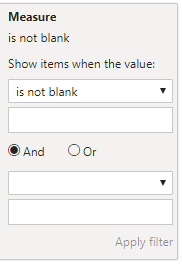
I think the easiest way is to set rules in the filter.
You could check if it works.
Give a try to below measure. I have revamped your measure.
Var_H = IF(SUM('SLSL Planning template'[plannedHours])<>0&&SUM(SLSL[Actual Charge(Rev/Mer)])<>0,SUM(SLSL[Actual Charge(Rev/Mer)])-SUM('SLSL Planning template'[plannedHours]))
PLease hit Thumbs up for support and accept this as a solution if it helps you!
this is incorrect measure
my measure is correct, the only thing i want to do is to hide those rose instead of returning blank
| User | Count |
|---|---|
| 57 | |
| 44 | |
| 32 | |
| 16 | |
| 14 |
| User | Count |
|---|---|
| 83 | |
| 67 | |
| 39 | |
| 27 | |
| 25 |