
Join us at FabCon Atlanta from March 16 - 20, 2026, for the ultimate Fabric, Power BI, AI and SQL community-led event. Save $200 with code FABCOMM.
Register now!The Power BI Data Visualization World Championships is back! It's time to submit your entry. Live now!
Hi All,
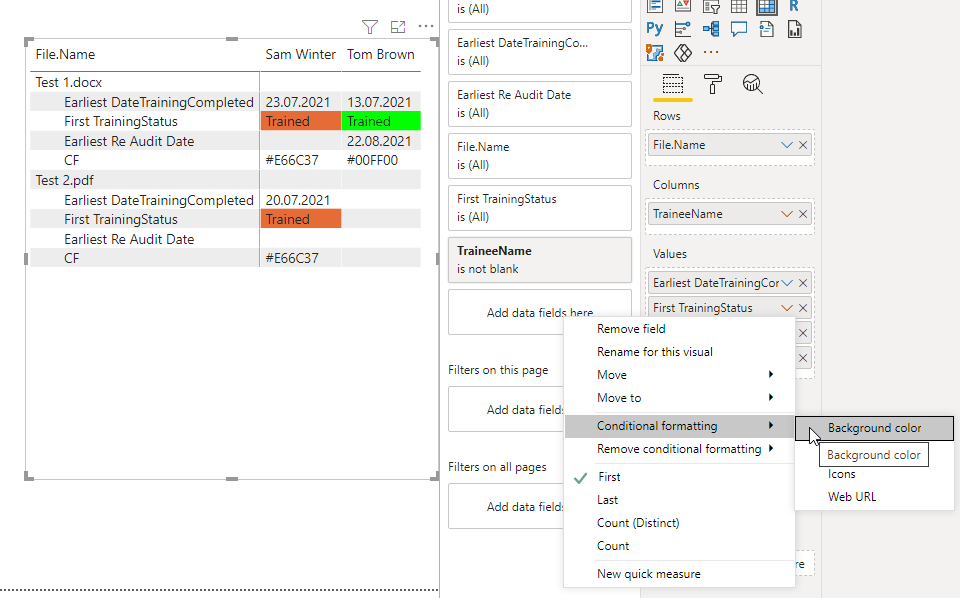
I am looking for some help with conditional formatting; i have created a training matrix that requires the status column to be orange if the training completed date has been completed and the re-audit date is blank, and if both the training completed date and Re-audit date is populated then the status should turn green.
This is how my columns look in the matrix table:
Thank you
Solved! Go to Solution.
Hi @Anonymous ,
try the following measure for formatting.
CF =
IF (
MIN ( 'Training Records'[DateTrainingCompleted] ) <> BLANK ()
&& MIN ( 'Audit Record'[Re Audit Date] ) = BLANK (),
"#E66C37",
IF (
MIN ( 'Training Records'[DateTrainingCompleted] ) <> BLANK ()
&& MIN ( 'Audit Record'[Re Audit Date] ) <> BLANK (),
"#00FF00",
BLANK ()
)
)
Marcus Wegener works as Full Stack Power BI Engineer at BI or DIE.
His mission is clear: "Get the most out of data, with Power BI."
twitter - LinkedIn - YouTube - website - podcast - Power BI Tutorials
Hi @Anonymous ,
can you provide an example PBIX?
Marcus Wegener works as Full Stack Power BI Engineer at BI or DIE.
His mission is clear: "Get the most out of data, with Power BI."
twitter - LinkedIn - YouTube - website - podcast - Power BI Tutorials
Hi @mwegener,
Please find an example pbix file: https://1drv.ms/u/s!AqpscUO4vhcRkgmpWKu5Wt-ET72b?e=zVyx33
Thank you
Hi @Anonymous ,
try the following measure for formatting.
CF =
IF (
MIN ( 'Training Records'[DateTrainingCompleted] ) <> BLANK ()
&& MIN ( 'Audit Record'[Re Audit Date] ) = BLANK (),
"#E66C37",
IF (
MIN ( 'Training Records'[DateTrainingCompleted] ) <> BLANK ()
&& MIN ( 'Audit Record'[Re Audit Date] ) <> BLANK (),
"#00FF00",
BLANK ()
)
)
Marcus Wegener works as Full Stack Power BI Engineer at BI or DIE.
His mission is clear: "Get the most out of data, with Power BI."
twitter - LinkedIn - YouTube - website - podcast - Power BI Tutorials
The Power BI Data Visualization World Championships is back! It's time to submit your entry.
Check out the January 2026 Power BI update to learn about new features.
| User | Count |
|---|---|
| 56 | |
| 42 | |
| 41 | |
| 21 | |
| 21 |
| User | Count |
|---|---|
| 150 | |
| 107 | |
| 64 | |
| 36 | |
| 36 |