Join us at FabCon Atlanta from March 16 - 20, 2026, for the ultimate Fabric, Power BI, AI and SQL community-led event. Save $200 with code FABCOMM.
Register now!The Power BI Data Visualization World Championships is back! It's time to submit your entry. Live now!
Hi All,
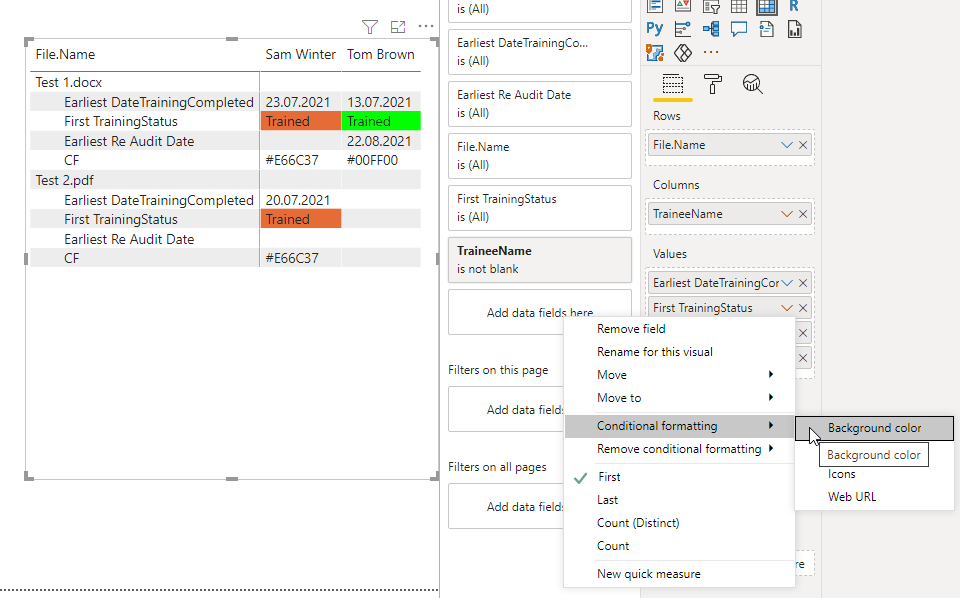
I am looking for some help with conditional formatting; i have created a training matrix that requires the status column to be orange if the training completed date has been completed and the re-audit date is blank, and if both the training completed date and Re-audit date is populated then the status should turn green.
This is how my columns look in the matrix table:
Thank you
Solved! Go to Solution.
Hi @Anonymous ,
try the following measure for formatting.
CF =
IF (
MIN ( 'Training Records'[DateTrainingCompleted] ) <> BLANK ()
&& MIN ( 'Audit Record'[Re Audit Date] ) = BLANK (),
"#E66C37",
IF (
MIN ( 'Training Records'[DateTrainingCompleted] ) <> BLANK ()
&& MIN ( 'Audit Record'[Re Audit Date] ) <> BLANK (),
"#00FF00",
BLANK ()
)
)
Marcus Wegener works as Full Stack Power BI Engineer at BI or DIE.
His mission is clear: "Get the most out of data, with Power BI."
twitter - LinkedIn - YouTube - website - podcast - Power BI Tutorials
Hi @Anonymous ,
can you provide an example PBIX?
Marcus Wegener works as Full Stack Power BI Engineer at BI or DIE.
His mission is clear: "Get the most out of data, with Power BI."
twitter - LinkedIn - YouTube - website - podcast - Power BI Tutorials
Hi @mwegener,
Please find an example pbix file: https://1drv.ms/u/s!AqpscUO4vhcRkgmpWKu5Wt-ET72b?e=zVyx33
Thank you
Hi @Anonymous ,
try the following measure for formatting.
CF =
IF (
MIN ( 'Training Records'[DateTrainingCompleted] ) <> BLANK ()
&& MIN ( 'Audit Record'[Re Audit Date] ) = BLANK (),
"#E66C37",
IF (
MIN ( 'Training Records'[DateTrainingCompleted] ) <> BLANK ()
&& MIN ( 'Audit Record'[Re Audit Date] ) <> BLANK (),
"#00FF00",
BLANK ()
)
)
Marcus Wegener works as Full Stack Power BI Engineer at BI or DIE.
His mission is clear: "Get the most out of data, with Power BI."
twitter - LinkedIn - YouTube - website - podcast - Power BI Tutorials
| User | Count |
|---|---|
| 49 | |
| 37 | |
| 33 | |
| 22 | |
| 18 |
| User | Count |
|---|---|
| 131 | |
| 99 | |
| 56 | |
| 37 | |
| 37 |
