This time we’re going bigger than ever. Fabric, Power BI, SQL, AI and more. We're covering it all. You won't want to miss it.
Learn moreDid you hear? There's a new SQL AI Developer certification (DP-800). Start preparing now and be one of the first to get certified. Register now
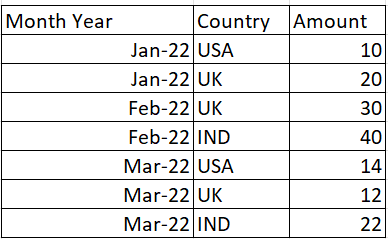
HI Export below my input
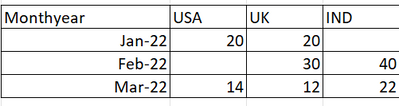
I have tried my Power BI report using Matrix below like
my problem is Jan-22 IND is blank(NO values in source table)
Feb-22 USA is BLank
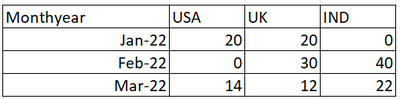
I need where Blank values replace Zero.
Expected Output.
Solved! Go to Solution.
Hi @Shanvitha_V ,
I created a sample pbix file(see the attachment) for you, please check whether that is what you want.
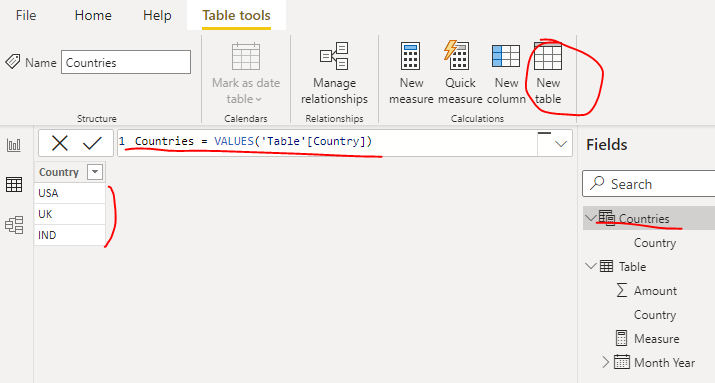
1. Create a country dimension table using below formula
Countries = VALUES('Table'[Country])
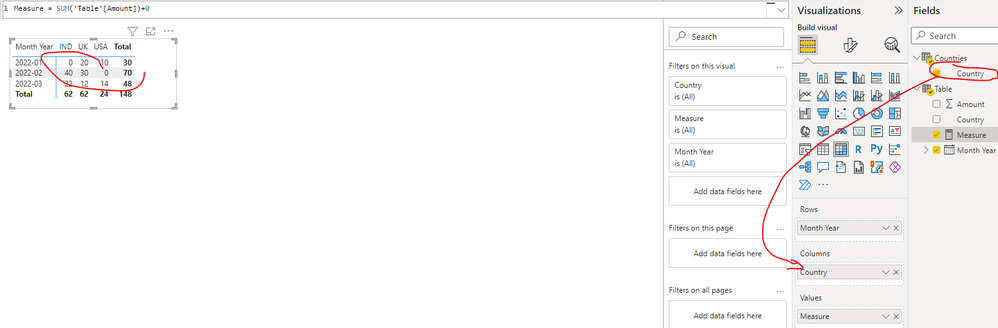
2. Create a measure as below:
Measure = SUM('Table'[Amount])+0
3. Create a matrix visual as below(Rows: field [Month Year] Columns: field [Country] of the country dimension table Values: new measure)
Best Regards
Hi @Shanvitha_V ,
I created a sample pbix file(see the attachment) for you, please check whether that is what you want.
1. Create a country dimension table using below formula
Countries = VALUES('Table'[Country])
2. Create a measure as below:
Measure = SUM('Table'[Amount])+0
3. Create a matrix visual as below(Rows: field [Month Year] Columns: field [Country] of the country dimension table Values: new measure)
Best Regards
Hi,
There is the same solve issue in the community, Please have a look :
https://community.powerbi.com/t5/Desktop/Replacing-null-values-in-matrix-visual/td-p/1019736
Appreciate your Kudos and please mark it as a solution if it helps
Check out the April 2026 Power BI update to learn about new features.
Sign up to receive a private message when registration opens and key events begin.
If you have recently started exploring Fabric, we'd love to hear how it's going. Your feedback can help with product improvements.
| User | Count |
|---|---|
| 34 | |
| 31 | |
| 30 | |
| 21 | |
| 16 |
| User | Count |
|---|---|
| 63 | |
| 53 | |
| 31 | |
| 23 | |
| 23 |