Join us at FabCon Atlanta from March 16 - 20, 2026, for the ultimate Fabric, Power BI, AI and SQL community-led event. Save $200 with code FABCOMM.
Register now!The Power BI Data Visualization World Championships is back! It's time to submit your entry. Live now!
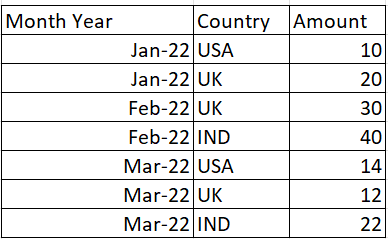
HI Export below my input
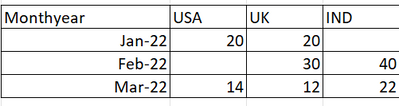
I have tried my Power BI report using Matrix below like
my problem is Jan-22 IND is blank(NO values in source table)
Feb-22 USA is BLank
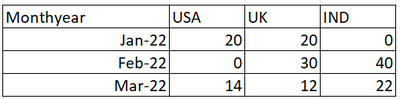
I need where Blank values replace Zero.
Expected Output.
Solved! Go to Solution.
Hi @Shanvitha_V ,
I created a sample pbix file(see the attachment) for you, please check whether that is what you want.
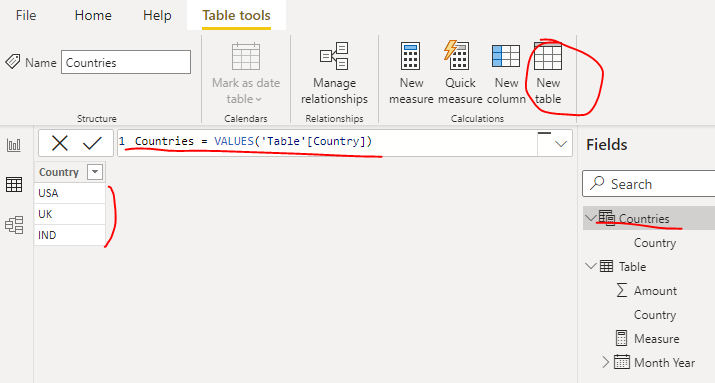
1. Create a country dimension table using below formula
Countries = VALUES('Table'[Country])
2. Create a measure as below:
Measure = SUM('Table'[Amount])+0
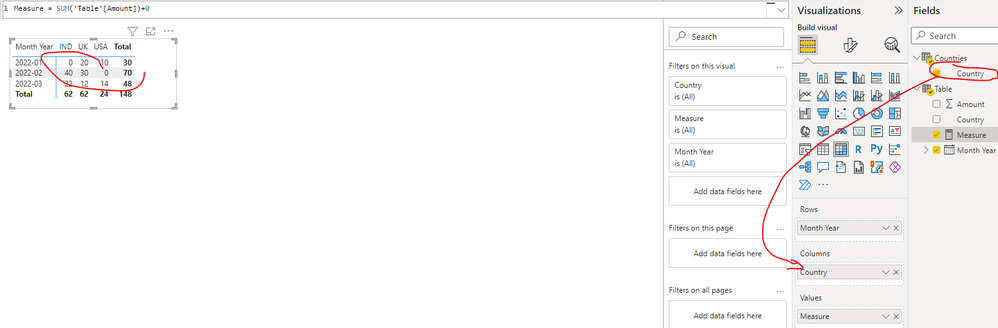
3. Create a matrix visual as below(Rows: field [Month Year] Columns: field [Country] of the country dimension table Values: new measure)
Best Regards
Hi @Shanvitha_V ,
I created a sample pbix file(see the attachment) for you, please check whether that is what you want.
1. Create a country dimension table using below formula
Countries = VALUES('Table'[Country])
2. Create a measure as below:
Measure = SUM('Table'[Amount])+0
3. Create a matrix visual as below(Rows: field [Month Year] Columns: field [Country] of the country dimension table Values: new measure)
Best Regards
Hi,
There is the same solve issue in the community, Please have a look :
https://community.powerbi.com/t5/Desktop/Replacing-null-values-in-matrix-visual/td-p/1019736
Appreciate your Kudos and please mark it as a solution if it helps
The Power BI Data Visualization World Championships is back! It's time to submit your entry.
Check out the January 2026 Power BI update to learn about new features.
| User | Count |
|---|---|
| 61 | |
| 48 | |
| 35 | |
| 25 | |
| 23 |
| User | Count |
|---|---|
| 134 | |
| 110 | |
| 59 | |
| 39 | |
| 32 |