This time we’re going bigger than ever. Fabric, Power BI, SQL, AI and more. We're covering it all. You won't want to miss it.
Learn moreLevel up your Power BI skills this month - build one visual each week and tell better stories with data! Get started
Hi,
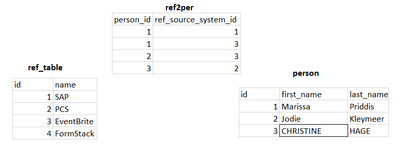
I have 2 tables having 1 to many relationship with the ref2per table.
I' am trying to get a matrix something like below:
| name | SAP | PCS | EventBrite |
| SAP | 1 | ||
| PCS | 1 | ||
| EventBrite | 1 | 1 |
SAP and EventBrite has count 1 since person id 1 is shared between them. Same applies on the other way round. Since person id 2 has only one reference, the value is 1 for matrix EventBrite to EventBrite.
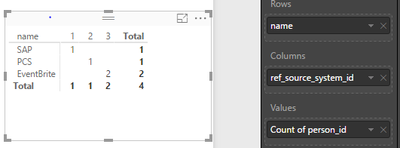
Just using the UI I'am getting the below result.
I'am still a rookie with the DAX commands, so any thoughts on how the required result can be achieved.
Thanks
Rakesh
Solved! Go to Solution.
Hi @rakesh-k01,
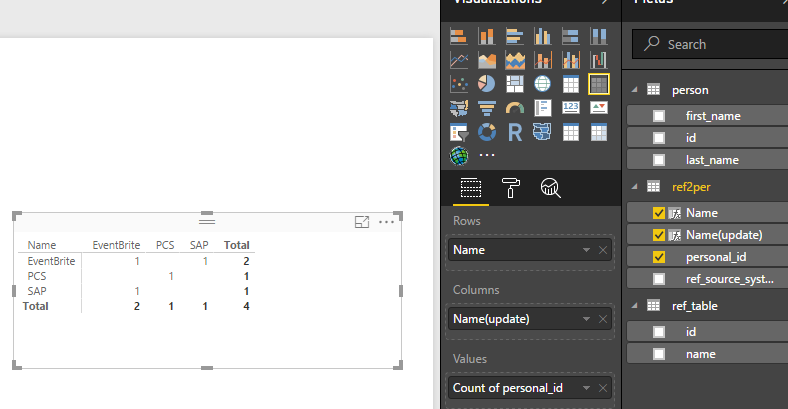
You can create calculated columns in ref2per table like below:
Name = RELATED('ref_table'[name])
Name(update) = var t=CALCULATE(MAX('ref2per'[ref_source_system_id]),ALLEXCEPT(ref2per,'ref2per'[personal_id]))
return
IF('ref2per'[ref_source_system_id]<> t,CALCULATE(MIN('ref2per'[Name]),ALLEXCEPT(ref2per,'ref2per'[personal_id])),
CALCULATE(MAX('ref2per'[Name]),ALLEXCEPT(ref2per,'ref2per'[personal_id])))
Best Regards,
Qiuyun Yu
Hi @rakesh-k01,
You can create calculated columns in ref2per table like below:
Name = RELATED('ref_table'[name])
Name(update) = var t=CALCULATE(MAX('ref2per'[ref_source_system_id]),ALLEXCEPT(ref2per,'ref2per'[personal_id]))
return
IF('ref2per'[ref_source_system_id]<> t,CALCULATE(MIN('ref2per'[Name]),ALLEXCEPT(ref2per,'ref2per'[personal_id])),
CALCULATE(MAX('ref2per'[Name]),ALLEXCEPT(ref2per,'ref2per'[personal_id])))
Best Regards,
Qiuyun Yu
Check out the April 2026 Power BI update to learn about new features.
Sign up to receive a private message when registration opens and key events begin.
If you have recently started exploring Fabric, we'd love to hear how it's going. Your feedback can help with product improvements.
| User | Count |
|---|---|
| 39 | |
| 28 | |
| 28 | |
| 22 | |
| 18 |
| User | Count |
|---|---|
| 67 | |
| 37 | |
| 32 | |
| 26 | |
| 25 |