Join us at FabCon Atlanta from March 16 - 20, 2026, for the ultimate Fabric, Power BI, AI and SQL community-led event. Save $200 with code FABCOMM.
Register now!Vote for your favorite vizzies from the Power BI Dataviz World Championship submissions. Vote now!
Dear all,
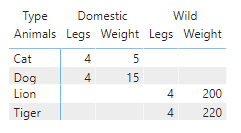
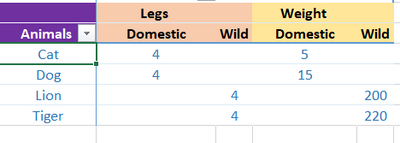
I have the below data in excel and I would like to create a pivot in PowerBI as shown below. But I am unable to achieve the view I need. (Column Header interchange) The below is just an example :
Sample data:
| Animals | Type | Legs | Weight |
| Lion | Wild | 4 | 200 |
| Tiger | Wild | 4 | 220 |
| Dog | Domestic | 4 | 15 |
| Cat | Domestic | 4 | 5 |
Currently in PowerBI:
Desired View:
I have come across few posts suggesting unpivotting / calculation groups as a probable solution. But the dataset is of huge capacity and dont think both are feasable. Are there any other ways to achieve the desired view?
Solved! Go to Solution.
Hi @Tiphany01
Thanks for reaching out to us.
You can try this, create the table
Table1 = GENERATE(
VALUES('Table'[Animals]),
{"Legs","Weight"})
then create a measure
Measure =
IF(MAX([Value])="Weight",
CALCULATE(SUM('Table'[Weight]),FILTER('Table',[Type]=MAX([Type])&&[Animals]=MAX('Table1'[Animals]))),
CALCULATE(SUM('Table'[Legs]),FILTER('Table',[Type]=MAX([Type])&&[Animals]=MAX('Table1'[Animals]))))
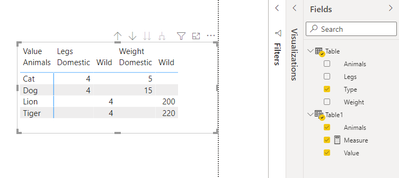
result
Best Regards,
Community Support Team _Tang
If this post helps, please consider Accept it as the solution to help the other members find it more quickly.
Hi @Tiphany01
Thanks for reaching out to us.
You can try this, create the table
Table1 = GENERATE(
VALUES('Table'[Animals]),
{"Legs","Weight"})
then create a measure
Measure =
IF(MAX([Value])="Weight",
CALCULATE(SUM('Table'[Weight]),FILTER('Table',[Type]=MAX([Type])&&[Animals]=MAX('Table1'[Animals]))),
CALCULATE(SUM('Table'[Legs]),FILTER('Table',[Type]=MAX([Type])&&[Animals]=MAX('Table1'[Animals]))))
result
Best Regards,
Community Support Team _Tang
If this post helps, please consider Accept it as the solution to help the other members find it more quickly.
@Tiphany01 , You need to unpivot the columns for that, Then only you will be able to move leg and weight up
https://radacad.com/pivot-and-unpivot-with-power-bi
other option
column header grouping
https://www.daxpatterns.com/dynamic-segmentation/
https://community.powerbi.com/t5/Desktop/Matrix-Display-Values-above-Columns/td-p/256905
https://community.powerbi.com/t5/Desktop/grouping-measure-results/td-p/456795
Vote for your favorite vizzies from the Power BI World Championship submissions!
If you love stickers, then you will definitely want to check out our Community Sticker Challenge!
Check out the January 2026 Power BI update to learn about new features.
| User | Count |
|---|---|
| 64 | |
| 51 | |
| 46 | |
| 23 | |
| 19 |
| User | Count |
|---|---|
| 138 | |
| 111 | |
| 50 | |
| 33 | |
| 29 |