cancel
Showing results for 
Search instead for 
Did you mean: 

The Power BI Data Visualization World Championships is back! Get ahead of the game and start preparing now! Learn more

Reply
Tiphany01
Frequent Visitor

Matrix multiple measures display

Dear all,

I have the below data in excel and I would like to create a pivot in PowerBI as shown below. But I am unable to achieve the view I need. (Column Header interchange) The below is just an example :


Sample data:

AnimalsTypeLegsWeight
LionWild4200
TigerWild4220
DogDomestic415
CatDomestic45


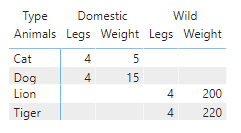
Currently in PowerBI:

Tiphany01_0-1634557521682.png


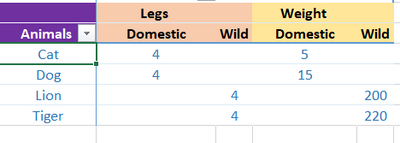
Desired View:

Tiphany01_1-1634557559021.png

I have come across few posts suggesting unpivotting / calculation groups as a probable solution. But the dataset is of huge capacity and dont think both are feasable. Are there any other ways to achieve the desired view? 

1 ACCEPTED SOLUTION
v-xiaotang
Community Support
Community Support

Hi @Tiphany01 

Thanks for reaching out to us.

You can try this, create the table

vxiaotang_0-1634806581446.png

Table1 = GENERATE(
    VALUES('Table'[Animals]),
    {"Legs","Weight"})

then create a measure

Measure = 
    IF(MAX([Value])="Weight",
        CALCULATE(SUM('Table'[Weight]),FILTER('Table',[Type]=MAX([Type])&&[Animals]=MAX('Table1'[Animals]))),
        CALCULATE(SUM('Table'[Legs]),FILTER('Table',[Type]=MAX([Type])&&[Animals]=MAX('Table1'[Animals]))))

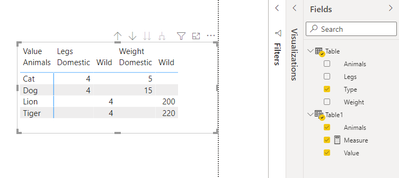
result

vxiaotang_1-1634806637340.png


Best Regards,

Community Support Team _Tang

If this post helps, please consider Accept it as the solution to help the other members find it more quickly.

View solution in original post

2 REPLIES 2
v-xiaotang
Community Support
Community Support

Hi @Tiphany01 

Thanks for reaching out to us.

You can try this, create the table

vxiaotang_0-1634806581446.png

Table1 = GENERATE(
    VALUES('Table'[Animals]),
    {"Legs","Weight"})

then create a measure

Measure = 
    IF(MAX([Value])="Weight",
        CALCULATE(SUM('Table'[Weight]),FILTER('Table',[Type]=MAX([Type])&&[Animals]=MAX('Table1'[Animals]))),
        CALCULATE(SUM('Table'[Legs]),FILTER('Table',[Type]=MAX([Type])&&[Animals]=MAX('Table1'[Animals]))))

result

vxiaotang_1-1634806637340.png


Best Regards,

Community Support Team _Tang

If this post helps, please consider Accept it as the solution to help the other members find it more quickly.

amitchandak
Super User
Super User

@Tiphany01 , You need to unpivot the columns for that, Then only you will be able to move leg and weight up 


https://radacad.com/pivot-and-unpivot-with-power-bi


other option

column header grouping
https://www.daxpatterns.com/dynamic-segmentation/
https://community.powerbi.com/t5/Desktop/Matrix-Display-Values-above-Columns/td-p/256905
https://community.powerbi.com/t5/Desktop/grouping-measure-results/td-p/456795


Share with Power BI Enthusiasts: Full Power BI Video (20 Hours) YouTube
Microsoft Fabric Series 60+ Videos YouTube
Microsoft Fabric Hindi End to End YouTube

Helpful resources

Announcements
Power BI DataViz World Championships

Power BI Dataviz World Championships

The Power BI Data Visualization World Championships is back! Get ahead of the game and start preparing now!

November Power BI Update Carousel

Power BI Monthly Update - November 2025

Check out the November 2025 Power BI update to learn about new features.

FabCon Atlanta 2026 carousel

FabCon Atlanta 2026

Join us at FabCon Atlanta, March 16-20, for the ultimate Fabric, Power BI, AI and SQL community-led event. Save $200 with code FABCOMM.