cancel
Showing results for 
Search instead for 
Did you mean: 

The Power BI Data Visualization World Championships is back! Get ahead of the game and start preparing now! Learn more

Reply
GReyes85
Frequent Visitor

Matrix issues

Hello, 

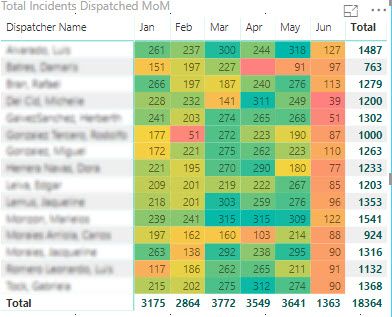
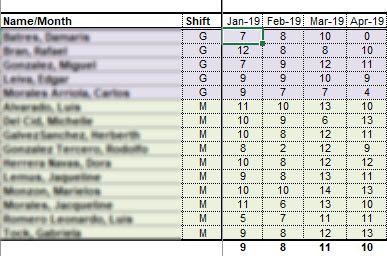
I'm new to Power BI and with that, I'm struggling with something basic, yet I believe simple. In a Matrix I created in PBI Desktop I managed to get the amount of incidents dispatched per analyst YTD by month. Now, Out of that calculation shown, I need to calculate the Dispatched Rate per month, per agent. I have tried about anything and I can't seem to get this working, any help you can give me? 


This is the Matrix I managed to get done in PBI: (Total of Incidents Dispatched per Analyst per month):

Matrix in PBI.jpg


And this is the table I have created in Excel with the Dispatched Rate calculation, for this, I used the following formula: =C3/NETWORKDAYS($C$21,EOMONTH($C$21,0)), where C3 makes reference to the total of the incidents dispatched per Analyst, divided by the Network days of the month in question: 

Desired Calculation based on previous Matrix.jpg

Any thoughts will be appreciated 


Thanks! 

1 ACCEPTED SOLUTION
Anonymous
Not applicable

Hi @GReyes85 ,

Can you please more about your data structure and matrix fields to help clarify your scenario? It is hard to coding formula without any detail informations.

You can also try to use following measure formula if it works:

Measure =
VAR currDate =
    MAX ( Table[Date] )
RETURN
    DIVIDE (
        COUNT ( Table[Column] ),
        COUNTROWS (
            FILTER (
                CALENDAR ( currDate, DATE ( YEAR ( currDate ), MONTH ( currDate ) + 1, 1 ) - 1 ),
                WEEKDAY ( [Date], 2 ) <= 5
            )
        )
    )

Regards,

Xiaoxin Sheng

View solution in original post

1 REPLY 1
Anonymous
Not applicable

Hi @GReyes85 ,

Can you please more about your data structure and matrix fields to help clarify your scenario? It is hard to coding formula without any detail informations.

You can also try to use following measure formula if it works:

Measure =
VAR currDate =
    MAX ( Table[Date] )
RETURN
    DIVIDE (
        COUNT ( Table[Column] ),
        COUNTROWS (
            FILTER (
                CALENDAR ( currDate, DATE ( YEAR ( currDate ), MONTH ( currDate ) + 1, 1 ) - 1 ),
                WEEKDAY ( [Date], 2 ) <= 5
            )
        )
    )

Regards,

Xiaoxin Sheng

Helpful resources

Announcements
Power BI DataViz World Championships

Power BI Dataviz World Championships

The Power BI Data Visualization World Championships is back! Get ahead of the game and start preparing now!

December 2025 Power BI Update Carousel

Power BI Monthly Update - December 2025

Check out the December 2025 Power BI Holiday Recap!

FabCon Atlanta 2026 carousel

FabCon Atlanta 2026

Join us at FabCon Atlanta, March 16-20, for the ultimate Fabric, Power BI, AI and SQL community-led event. Save $200 with code FABCOMM.