Get certified for free when you join Fabric Data Days 2026 and dive into Fabric, Power BI, SQL, AI, and other essential data skills.
Join nowJuly 7 - July 17 | Round 2 of the Power BI Dataviz World Championships. Don't miss your chance! Learn more
Hi,
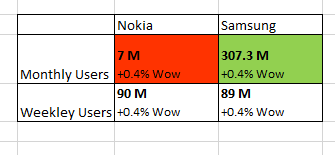
I have to matrix report below format
Below challenges i m facing.
1) I have created calulcated column to concatinate 7M and +0.4%WoW but I have to show 7M in bold and +0.4%WoW not in bold.
2)Let me know any other custom visuals that can display above format which has conditional formatting also.
Solved! Go to Solution.
Hi @atul9063,
Does that make sense? If so, kindly mark my answer as a solution to close the case.
Regards,
Frank
Hi @atul9063,
Could you please share the sample data here? You can upload your file to dorpbox and share the link here.
Regards,
Frank
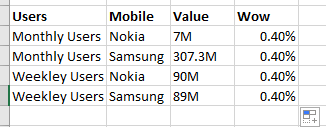
I cant upload file.PFB data snaposhot
Hi @atul9063,
We can create a calculate column to work on it. However we cannot show the text in bold by DAX here.
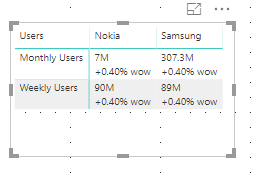
Column = 'Table1'[Value]& UNICHAR(10)& "+"& FORMAT('Table1'[Wow],"percent") & " wow"
For more details, please check the pbix as attached.
Regards,
Frank
Hi @atul9063,
Does that make sense? If so, kindly mark my answer as a solution to close the case.
Regards,
Frank
Join us in Barcelona for FabCon and SQLCon, the Fabric, Power BI, SQL, and AI community event. Save €200 with code FABCMTY200.
Join Fabric Data Days 2026: 60 days of free live/on-demand sessions, challenges, study groups, and certification opportunities.
| User | Count |
|---|---|
| 22 | |
| 22 | |
| 18 | |
| 17 | |
| 13 |
| User | Count |
|---|---|
| 63 | |
| 50 | |
| 46 | |
| 41 | |
| 39 |