Join us at FabCon Atlanta from March 16 - 20, 2026, for the ultimate Fabric, Power BI, AI and SQL community-led event. Save $200 with code FABCOMM.
Register now!The Power BI Data Visualization World Championships is back! Get ahead of the game and start preparing now! Learn more
Hi,
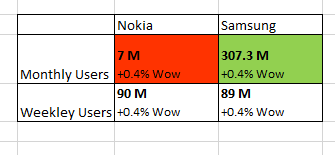
I have to matrix report below format
Below challenges i m facing.
1) I have created calulcated column to concatinate 7M and +0.4%WoW but I have to show 7M in bold and +0.4%WoW not in bold.
2)Let me know any other custom visuals that can display above format which has conditional formatting also.
Solved! Go to Solution.
Hi @atul9063,
Does that make sense? If so, kindly mark my answer as a solution to close the case.
Regards,
Frank
Hi @atul9063,
Could you please share the sample data here? You can upload your file to dorpbox and share the link here.
Regards,
Frank
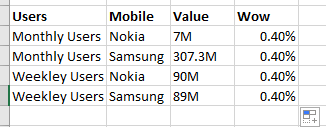
I cant upload file.PFB data snaposhot
Hi @atul9063,
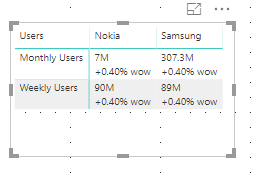
We can create a calculate column to work on it. However we cannot show the text in bold by DAX here.
Column = 'Table1'[Value]& UNICHAR(10)& "+"& FORMAT('Table1'[Wow],"percent") & " wow"
For more details, please check the pbix as attached.
Regards,
Frank
Hi @atul9063,
Does that make sense? If so, kindly mark my answer as a solution to close the case.
Regards,
Frank
The Power BI Data Visualization World Championships is back! Get ahead of the game and start preparing now!
Check out the November 2025 Power BI update to learn about new features.
| User | Count |
|---|---|
| 59 | |
| 46 | |
| 42 | |
| 23 | |
| 18 |
| User | Count |
|---|---|
| 192 | |
| 125 | |
| 99 | |
| 67 | |
| 48 |