Get Fabric or SQL Certified for Free.
Get certified for free when you join Fabric Data Days 2026 and dive into Fabric, Power BI, SQL, AI, and other essential data skills.
Join now- Power BI forums
- Get Help with Power BI
- Desktop
- Service
- Report Server
- Power Query
- Mobile Apps
- Developer
- DAX Commands and Tips
- Custom Visuals Development Discussion
- Health and Life Sciences
- Power BI Spanish forums
- Translated Spanish Desktop
- Training and Consulting
- Instructor Led Training
- Dashboard in a Day for Women, by Women
- Galleries
- Data Stories Gallery
- Themes Gallery
- Contests Gallery
- QuickViz Gallery
- Quick Measures Gallery
- Visual Calculations Gallery
- Fabric Apps Gallery
- Notebook Gallery
- Translytical Task Flow Gallery
- TMDL Gallery
- R Script Showcase
- Webinars and Video Gallery
- Ideas
- Custom Visuals Ideas (read-only)
- Issues
- Issues
- Events
- Upcoming Events
July 28 - August 9 | Final Round of the Power BI Dataviz World Championships. This is your chance. Learn more
- Power BI forums
- Forums
- Get Help with Power BI
- Desktop
- Re: Matrix Subtotal Issue
- Subscribe to RSS Feed
- Mark Topic as New
- Mark Topic as Read
- Float this Topic for Current User
- Bookmark
- Subscribe
- Printer Friendly Page

- Mark as New
- Bookmark
- Subscribe
- Mute
- Subscribe to RSS Feed
- Permalink
- Report Inappropriate Content
Matrix Subtotal Issue
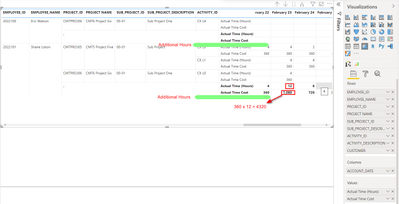
I have created a matrix visualization using a table. I want to change subtotal value as below image. Also need to add separate line as additional hours and it is a calculation (Total Actual Time hours - 8). Appriciate if anyone can help me to solve this.
Matrix -
Source -

Solved! Go to Solution.


- Mark as New
- Bookmark
- Subscribe
- Mute
- Subscribe to RSS Feed
- Permalink
- Report Inappropriate Content
Hi @deepalsoft
For this case Source no matter.Some It happen in Matrix Visual.
Try This formula Template.
First You Neeed to Create one Measure.
Measure 1=Calculate(Sum(Sales))
You Should Measure 2 paa into the Visuals.
Measure 2=IF (
HASONEFILTER ( Column Name ),Measure 1,Sumx(Values(Column Name),Measure 1))
If i have answered your Qus Kindly Give Kudos and Accepeted a Solution.
Thanks,
Thennarasu

- Mark as New
- Bookmark
- Subscribe
- Mute
- Subscribe to RSS Feed
- Permalink
- Report Inappropriate Content
Use hasonevalue function there.
- Mark as New
- Bookmark
- Subscribe
- Mute
- Subscribe to RSS Feed
- Permalink
- Report Inappropriate Content
@Anonymous
I thought Hashone is not correct one . Why I'm Saying This one HashoneValue function accepted Cross Filter .
Hashone filter Ignore Cross Filter That a Reason for this scenarios I choose the Hashonefilter.
If i have answered your Qus Kindly Give Kudos and Accepeted a Solution.
Thanks ,
Thennarasu
- Mark as New
- Bookmark
- Subscribe
- Mute
- Subscribe to RSS Feed
- Permalink
- Report Inappropriate Content
Hi @deepalsoft
For this case Source no matter.Some It happen in Matrix Visual.
Try This formula Template.
First You Neeed to Create one Measure.
Measure 1=Calculate(Sum(Sales))
You Should Measure 2 paa into the Visuals.
Measure 2=IF (
HASONEFILTER ( Column Name ),Measure 1,Sumx(Values(Column Name),Measure 1))
If i have answered your Qus Kindly Give Kudos and Accepeted a Solution.
Thanks,
Thennarasu
- Mark as New
- Bookmark
- Subscribe
- Mute
- Subscribe to RSS Feed
- Permalink
- Report Inappropriate Content
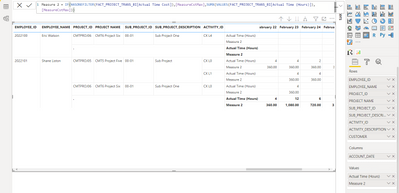
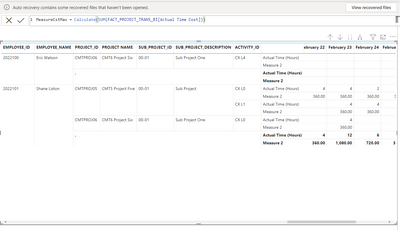
Same result. anythis is wrong?
Measure 2
Measure 1
- Mark as New
- Bookmark
- Subscribe
- Mute
- Subscribe to RSS Feed
- Permalink
- Report Inappropriate Content
@deepalsoft
Yes you Did some mistake
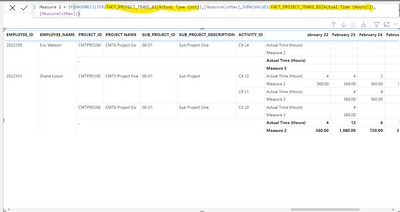
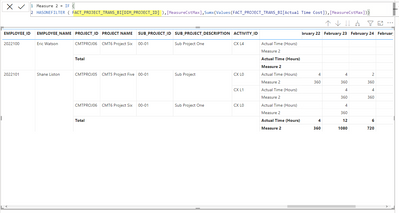
I marked in this image there you Should Use Employee Id Columns or Other Columns .Don't use the Actual Time Cost Column Both Place .
If i have answered your Qus Kindly Give Kudos and Accepeted a Solution.
Thanks,
Thennarasu
- Mark as New
- Bookmark
- Subscribe
- Mute
- Subscribe to RSS Feed
- Permalink
- Report Inappropriate Content
I have change as you said. but i need subtotal as
Eg - 12 x 360 = 4320
- Mark as New
- Bookmark
- Subscribe
- Mute
- Subscribe to RSS Feed
- Permalink
- Report Inappropriate Content
@deepalsoft
Try this one .
Your Requirements Multiple two Column So You should put One more Measure.
Measure 2=IF (
HASONEFILTER ( Column Name ),Measure 1,Sumx(Values(Column Name),Measure 1 *Actual Time Hours Measure))
If i have answered your Qus Kindly Give Kudos and Accepeted a Solution.
Thanks,
Thennarasu
- Mark as New
- Bookmark
- Subscribe
- Mute
- Subscribe to RSS Feed
- Permalink
- Report Inappropriate Content
Still I have a same output. But I will try your DAX in different ways.
- Mark as New
- Bookmark
- Subscribe
- Mute
- Subscribe to RSS Feed
- Permalink
- Report Inappropriate Content
@deepalsoft
Yes you Did some mistake
I marked in this image there you Should Use Employee Id Columns or Other Columns .Don't use the Actual Time Cost Column Both Place .
If i have answered your Qus Kindly Give Kudos and Accepeted a Solution.
Thanks,
Thennarasu
Helpful resources

Fabric Community Sticker Challenge - Barcelona 2026
If you love stickers, then you will definitely want to check out our community sticker challenge, Barcelona edition!

Power BI Monthly Update - July 2026
Check out the July 2026 Power BI update to learn about new features.

Power BI DataViz World Championships - June 2026
A new Power BI DataViz World Championship is coming this June! Don't miss out on submitting your entry.

| User | Count |
|---|---|
| 30 | |
| 28 | |
| 23 | |
| 21 | |
| 19 |


| User | Count |
|---|---|
| 39 | |
| 31 | |
| 18 | |
| 17 | |
| 15 |


