Join us in Barcelona for FabCon and SQLCon, September 28 - October 1, 2026.
This is best Fabric, Power BI, SQL and AI community event. How do we know? The last event sold out! Save €200 with code FABCMTY200.
Register now- Power BI forums
- Get Help with Power BI
- Desktop
- Service
- Report Server
- Power Query
- Mobile Apps
- Developer
- DAX Commands and Tips
- Custom Visuals Development Discussion
- Health and Life Sciences
- Power BI Spanish forums
- Translated Spanish Desktop
- Training and Consulting
- Instructor Led Training
- Dashboard in a Day for Women, by Women
- Galleries
- Data Stories Gallery
- Themes Gallery
- Contests Gallery
- QuickViz Gallery
- Quick Measures Gallery
- Visual Calculations Gallery
- Fabric Apps Gallery
- Notebook Gallery
- Translytical Task Flow Gallery
- TMDL Gallery
- R Script Showcase
- Webinars and Video Gallery
- Ideas
- Custom Visuals Ideas (read-only)
- Issues
- Issues
- Events
- Upcoming Events
July 28 - August 9 | Final Round of the Power BI Dataviz World Championships. This is your chance. Learn more
- Power BI forums
- Forums
- Get Help with Power BI
- Desktop
- Matrix Subtotal Issue
- Subscribe to RSS Feed
- Mark Topic as New
- Mark Topic as Read
- Float this Topic for Current User
- Bookmark
- Subscribe
- Printer Friendly Page

- Mark as New
- Bookmark
- Subscribe
- Mute
- Subscribe to RSS Feed
- Permalink
- Report Inappropriate Content
Matrix Subtotal Issue
I have created a matrix visualization using a table. I want to change subtotal value as below image. Also need to add separate line as additional hours and it is a calculation (Total Actual Time hours - 8). Appriciate if anyone can help me to solve this.
Matrix -
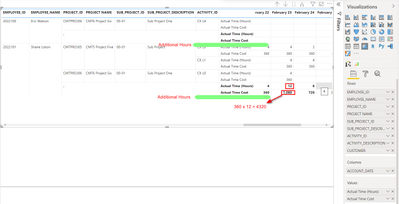
Source -

Solved! Go to Solution.


- Mark as New
- Bookmark
- Subscribe
- Mute
- Subscribe to RSS Feed
- Permalink
- Report Inappropriate Content
Hi @deepalsoft
For this case Source no matter.Some It happen in Matrix Visual.
Try This formula Template.
First You Neeed to Create one Measure.
Measure 1=Calculate(Sum(Sales))
You Should Measure 2 paa into the Visuals.
Measure 2=IF (
HASONEFILTER ( Column Name ),Measure 1,Sumx(Values(Column Name),Measure 1))
If i have answered your Qus Kindly Give Kudos and Accepeted a Solution.
Thanks,
Thennarasu

- Mark as New
- Bookmark
- Subscribe
- Mute
- Subscribe to RSS Feed
- Permalink
- Report Inappropriate Content
Use hasonevalue function there.
- Mark as New
- Bookmark
- Subscribe
- Mute
- Subscribe to RSS Feed
- Permalink
- Report Inappropriate Content
@Anonymous
I thought Hashone is not correct one . Why I'm Saying This one HashoneValue function accepted Cross Filter .
Hashone filter Ignore Cross Filter That a Reason for this scenarios I choose the Hashonefilter.
If i have answered your Qus Kindly Give Kudos and Accepeted a Solution.
Thanks ,
Thennarasu
- Mark as New
- Bookmark
- Subscribe
- Mute
- Subscribe to RSS Feed
- Permalink
- Report Inappropriate Content
Hi @deepalsoft
For this case Source no matter.Some It happen in Matrix Visual.
Try This formula Template.
First You Neeed to Create one Measure.
Measure 1=Calculate(Sum(Sales))
You Should Measure 2 paa into the Visuals.
Measure 2=IF (
HASONEFILTER ( Column Name ),Measure 1,Sumx(Values(Column Name),Measure 1))
If i have answered your Qus Kindly Give Kudos and Accepeted a Solution.
Thanks,
Thennarasu
- Mark as New
- Bookmark
- Subscribe
- Mute
- Subscribe to RSS Feed
- Permalink
- Report Inappropriate Content
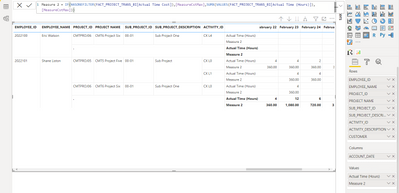
Same result. anythis is wrong?
Measure 2
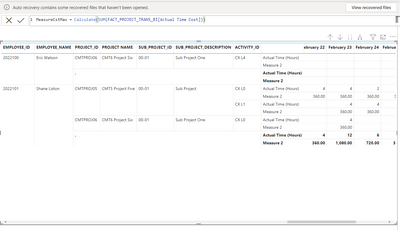
Measure 1
- Mark as New
- Bookmark
- Subscribe
- Mute
- Subscribe to RSS Feed
- Permalink
- Report Inappropriate Content
@deepalsoft
Yes you Did some mistake
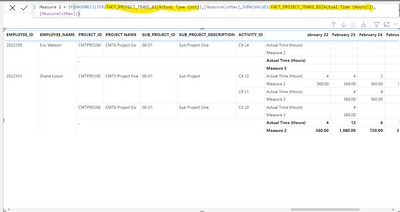
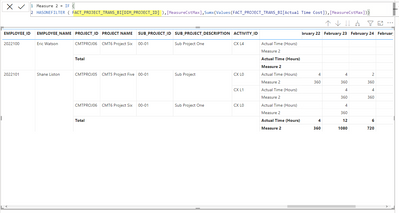
I marked in this image there you Should Use Employee Id Columns or Other Columns .Don't use the Actual Time Cost Column Both Place .
If i have answered your Qus Kindly Give Kudos and Accepeted a Solution.
Thanks,
Thennarasu
- Mark as New
- Bookmark
- Subscribe
- Mute
- Subscribe to RSS Feed
- Permalink
- Report Inappropriate Content
I have change as you said. but i need subtotal as
Eg - 12 x 360 = 4320
- Mark as New
- Bookmark
- Subscribe
- Mute
- Subscribe to RSS Feed
- Permalink
- Report Inappropriate Content
@deepalsoft
Try this one .
Your Requirements Multiple two Column So You should put One more Measure.
Measure 2=IF (
HASONEFILTER ( Column Name ),Measure 1,Sumx(Values(Column Name),Measure 1 *Actual Time Hours Measure))
If i have answered your Qus Kindly Give Kudos and Accepeted a Solution.
Thanks,
Thennarasu
- Mark as New
- Bookmark
- Subscribe
- Mute
- Subscribe to RSS Feed
- Permalink
- Report Inappropriate Content
Still I have a same output. But I will try your DAX in different ways.
- Mark as New
- Bookmark
- Subscribe
- Mute
- Subscribe to RSS Feed
- Permalink
- Report Inappropriate Content
@deepalsoft
Yes you Did some mistake
I marked in this image there you Should Use Employee Id Columns or Other Columns .Don't use the Actual Time Cost Column Both Place .
If i have answered your Qus Kindly Give Kudos and Accepeted a Solution.
Thanks,
Thennarasu
Helpful resources

FabCon & SQLCon – Barcelona 2026
Join us in Barcelona for FabCon and SQLCon, the Fabric, Power BI, SQL, and AI community event. Save €200 with code FABCMTY200.

Power BI DataViz World Championships - June 2026
A new Power BI DataViz World Championship is coming this June! Don't miss out on submitting your entry.

| User | Count |
|---|---|
| 26 | |
| 22 | |
| 20 | |
| 18 | |
| 14 |


| User | Count |
|---|---|
| 22 | |
| 20 | |
| 20 | |
| 20 | |
| 20 |


