This time we’re going bigger than ever. Fabric, Power BI, SQL, AI and more. We're covering it all. You won't want to miss it.
Learn moreGet Fabric Certified for FREE during AI Skills Fest. This week only. Secure your voucher now.
Hi all.
Using Power BI Desktop
I imported data, setup Model added 3 Measures:
Total A, Total B, Total A/B
On Matrix I added Accounts to Rows, Dates To Columns and Total A/B to Values.
Hmmmm.... I thought to myself...that does not look correct.
I added a new page. on new page I added
Account Slicer
Date Slicer
Card - Total A
Card - Total B
Card - Total A/B
I adjusted slicers for 1 account, 1 date
Card - Total A/B is giving the correct result.
Why would the Matrix not give the same result?
Thanks,
-w
Solved! Go to Solution.
I added the Date field from the Date Table as a second item on the Columns Shelf for the Matrix Visual.
I then removed the first date from the Columns Shelf which was coming from Table B.
The correct summary by first day of month remained - no further action needed - nice!
The Matrix now shows the correct result and ties-out to Card w/Slicers page.
Thanks,
-w
I added the Date field from the Date Table as a second item on the Columns Shelf for the Matrix Visual.
I then removed the first date from the Columns Shelf which was coming from Table B.
The correct summary by first day of month remained - no further action needed - nice!
The Matrix now shows the correct result and ties-out to Card w/Slicers page.
Thanks,
-w
Hey @UncleLewis ,
when the results are different the filter context will be different.
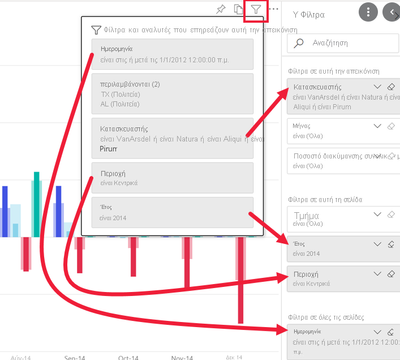
Can you hover over the filter icon for the matrix and also for the card visual?:
Then you should see which filter context is influencing the visuals and due to that difference in result.
You can also share the file, then I can take a look.
Check out the May 2026 Power BI update to learn about new features.
Sign up to receive a private message when registration opens and key events begin.
If you have recently started exploring Fabric, we'd love to hear how it's going. Your feedback can help with product improvements.
| User | Count |
|---|---|
| 24 | |
| 24 | |
| 21 | |
| 21 | |
| 18 |
| User | Count |
|---|---|
| 56 | |
| 52 | |
| 49 | |
| 26 | |
| 25 |