

Get certified for free when you join Fabric Data Days 2026 and dive into Fabric, Power BI, SQL, AI, and other essential data skills.
Join nowTry your skills in the Power BI Dataviz World Championship! Round one ends June 26. Join now
Hello, I am trying to create a Power BI Matrix from sales data that looks like:
To create a summary, by sales person, by count of their role in a sale:
I'm probably overthinking this, but can't seem to elegantly accomplish this without building side tables which extract each role and person and then merging those tables together. Anyone have ideas on this?
Solved! Go to Solution.
Hi, in Edit Query Select the 3 columns (Except Opp ID) and Transform Unpivot Columns.
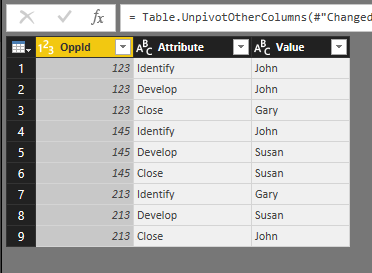
You'll obtain something like this:
Change the name of the Columns. Close & Apply
Finally in a Matrix
Hi, in Edit Query Select the 3 columns (Except Opp ID) and Transform Unpivot Columns.
You'll obtain something like this:
Change the name of the Columns. Close & Apply
Finally in a Matrix
You aren't going to get away from building a separate person table. Once you have done that you can probably write measures --
Total Id := DISTINCTCOUNT(MyTable[Identify])
Total Develop := DISTINCTCOUNT(MyTable[Develop])
...
Don't miss out on Data Days, June 15 through August 7. Learn Fabric, Power BI, SQL, AI and more.
Check out the May 2026 Power BI update to learn about new features.
| User | Count |
|---|---|
| 24 | |
| 22 | |
| 22 | |
| 20 | |
| 12 |
| User | Count |
|---|---|
| 68 | |
| 56 | |
| 42 | |
| 39 | |
| 30 |