cancel
Showing results for 
Search instead for 
Did you mean: 

Join the FabCon + SQLCon recap series. Up next: Power BI, Real-Time Intelligence, IQ and AI, and Data Factory take center stage. All sessions are available on-demand after the live show. Register now

Reply
EG115
Frequent Visitor

Matrix Issue

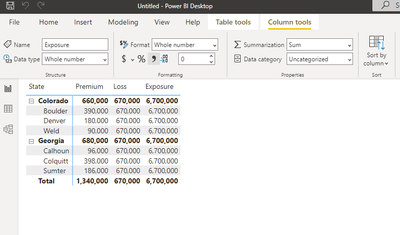
I am trying to report data at a State and County level with three different values (each value is brought in via it's own table). My issue is that the matrix only recognizes the value at a county level for the first value I add. The second and third value I add is incorrect at the county and state level. In the snip below the "Premium" column is accurate, but the "Loss" and "Exposure" columns are inaccurate. Each table is structured similarly with columns for "state", "county", "premium/loss/exposure".


Any suggestions? 


EG115_0-1656707826640.png


1 ACCEPTED SOLUTION
v-henryk-mstf
Community Support
Community Support

Hi @EG115 ,


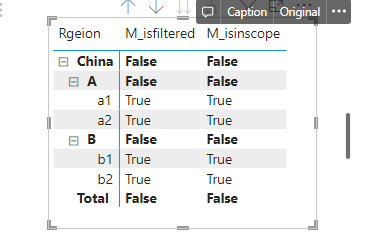
For this type of problem, the error may be caused by the filtering context in the formula. the ISINSCOPE and ISFILTERED functions are used to determine if the selected field is located in the hierarchy.

just like

M_isinscope = ISINSCOPE('Table'[City])
M_isfiltered = ISFILTERED('Table'[City])

vhenrykmstf_0-1657182849229.png

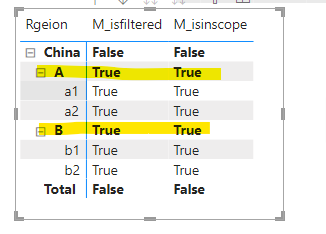
If you want the total corresponding to the current field City to also be True, then change the field to its previous level.

M_isfiltered = ISFILTERED('Table'[Country])
M_isinscope = ISINSCOPE('Table'[Country])

vhenrykmstf_1-1657182914598.png

If the problem is still not resolved, please provide detailed error information and test data. Looking forward to your reply.


Best Regards,
Henry


If this post helps, then please consider Accept it as the solution to help the other members find it more quickly.

View solution in original post

3 REPLIES 3
v-henryk-mstf
Community Support
Community Support

Hi @EG115 ,


For this type of problem, the error may be caused by the filtering context in the formula. the ISINSCOPE and ISFILTERED functions are used to determine if the selected field is located in the hierarchy.

just like

M_isinscope = ISINSCOPE('Table'[City])
M_isfiltered = ISFILTERED('Table'[City])

vhenrykmstf_0-1657182849229.png

If you want the total corresponding to the current field City to also be True, then change the field to its previous level.

M_isfiltered = ISFILTERED('Table'[Country])
M_isinscope = ISINSCOPE('Table'[Country])

vhenrykmstf_1-1657182914598.png

If the problem is still not resolved, please provide detailed error information and test data. Looking forward to your reply.


Best Regards,
Henry


If this post helps, then please consider Accept it as the solution to help the other members find it more quickly.

ALLUREAN
Solution Sage
Solution Sage

Hi, @EG115 

Are Loss and Exposure tables are connected at the same way like Premium? It looks like they are not connected to State table and the value is the same.


Did I answer your question? Mark my post as a solution!


https://allure-analytics.com/
https://www.youtube.com/channel/UCndD_QZVNB_JWYLEmP6KrpA
https://www.linkedin.com/company/77757292/

Proud to be a Super User!


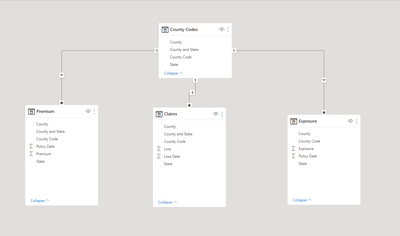
Here is a snip of the Model page. My only relationships are from the County Codes table connecting the "County" with a one-to-many relationship. Am I thinking about this all wrong? 


EG115_0-1656860305265.png


Here is a snip of the "Premium" table for reference. The loss and exposure data are identical with the only changes being the "Premium" value changing to either "Loss" or "Exposure". 

EG115_1-1656860378968.png


Helpful resources

Announcements
April Power BI Update Carousel

Power BI Monthly Update - April 2026

Check out the April 2026 Power BI update to learn about new features.

New to Fabric survey Carousel

New to Fabric Survey

If you have recently started exploring Fabric, we'd love to hear how it's going. Your feedback can help with product improvements.

Power BI DataViz World Championships carousel

Power BI DataViz World Championships - June 2026

A new Power BI DataViz World Championship is coming this June! Don't miss out on submitting your entry.

FabCon and SQLCon Highlights Carousel

FabCon &SQLCon Highlights

Experience the highlights from FabCon & SQLCon, available live and on-demand starting April 14th.