
Join us at FabCon Atlanta from March 16 - 20, 2026, for the ultimate Fabric, Power BI, AI and SQL community-led event. Save $200 with code FABCOMM.
Register now!The Power BI Data Visualization World Championships is back! It's time to submit your entry. Live now!
Hello there,
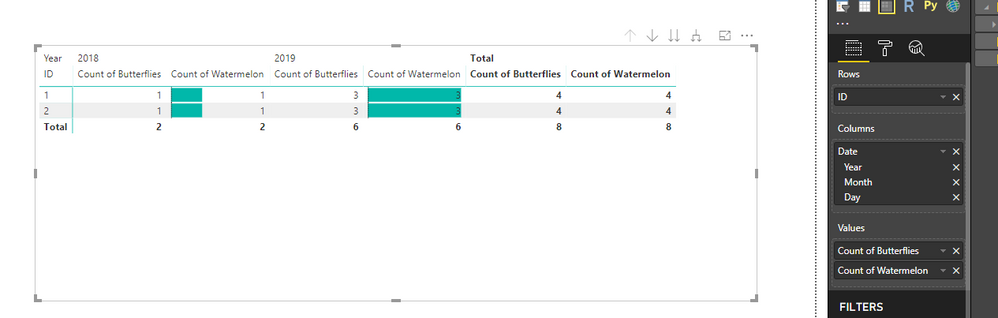
I would like to create a Matrix with 1 row, 3 columns (Date hierarchy) and 2 values. One of the values should be broken down by each column and one of the values should only display the total across all columns.
In the example attached, I would like to only display "Count of butterflies" in the Total column. The "Count of butterflies" from 2018 and 2019 columns should dissapear.
Is this possible?
Dashboard here: here
Solved! Go to Solution.
Hi @rvcedd
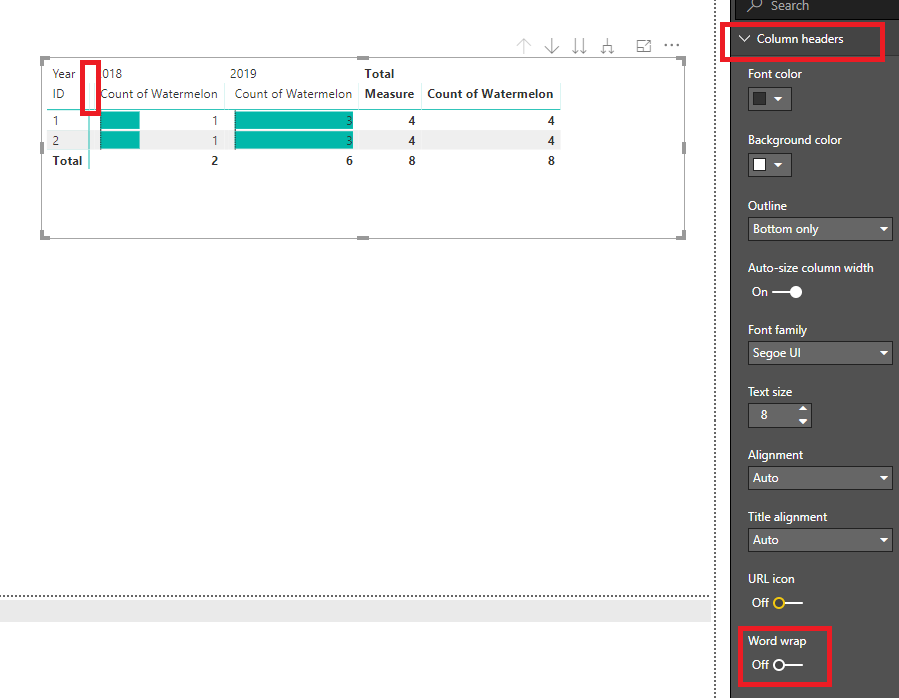
You may turn off the 'Word wrap' under 'Column headers'.Then drag the column manually to hide it.
Regards,
Hi @rvcedd
You may try to create a measure to replace "Count of butterflies"
Measure =
IF (
ISFILTERED ( Sheet1[Date].[Year] ) || ISFILTERED ( Sheet1[Date].[Month] )
|| ISFILTERED ( Sheet1[Date].[Day] ),
BLANK (),
CALCULATE ( COUNT ( Sheet1[Butterflies] ), ALL ( Sheet1[Date] ) )
)
Regards,
Hello,
Thanks for your reply. This solution doesn't solve the problem as the new created Measure still appears as a separate column in the table (it is empty but it still there). Is there any other solution?
Thanks,
Robert
Hi @rvcedd
You may turn off the 'Word wrap' under 'Column headers'.Then drag the column manually to hide it.
Regards,
Thanks. This is a good work around and I will accept it as a solution. It would be nice if this was a supported feature, do you know if this has been raised already or shall I submit a suggestion for improvement?
The Power BI Data Visualization World Championships is back! It's time to submit your entry.
Check out the January 2026 Power BI update to learn about new features.
| User | Count |
|---|---|
| 56 | |
| 42 | |
| 39 | |
| 23 | |
| 21 |
| User | Count |
|---|---|
| 144 | |
| 106 | |
| 63 | |
| 38 | |
| 31 |