
Don't miss your chance to take the Fabric Data Engineer (DP-600) exam for FREE! Find out how by watching the DP-600 session on-demand now through April 28th.
Learn moreJoin the FabCon + SQLCon recap series. Up next: Power BI, Real-Time Intelligence, IQ and AI, and Data Factory take center stage. All sessions are available on-demand after the live show. Register now
Hello there,
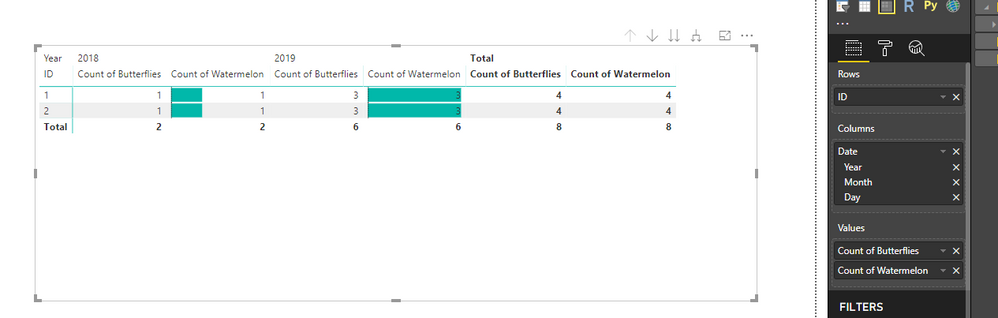
I would like to create a Matrix with 1 row, 3 columns (Date hierarchy) and 2 values. One of the values should be broken down by each column and one of the values should only display the total across all columns.
In the example attached, I would like to only display "Count of butterflies" in the Total column. The "Count of butterflies" from 2018 and 2019 columns should dissapear.
Is this possible?
Dashboard here: here
Solved! Go to Solution.
Hi @rvcedd
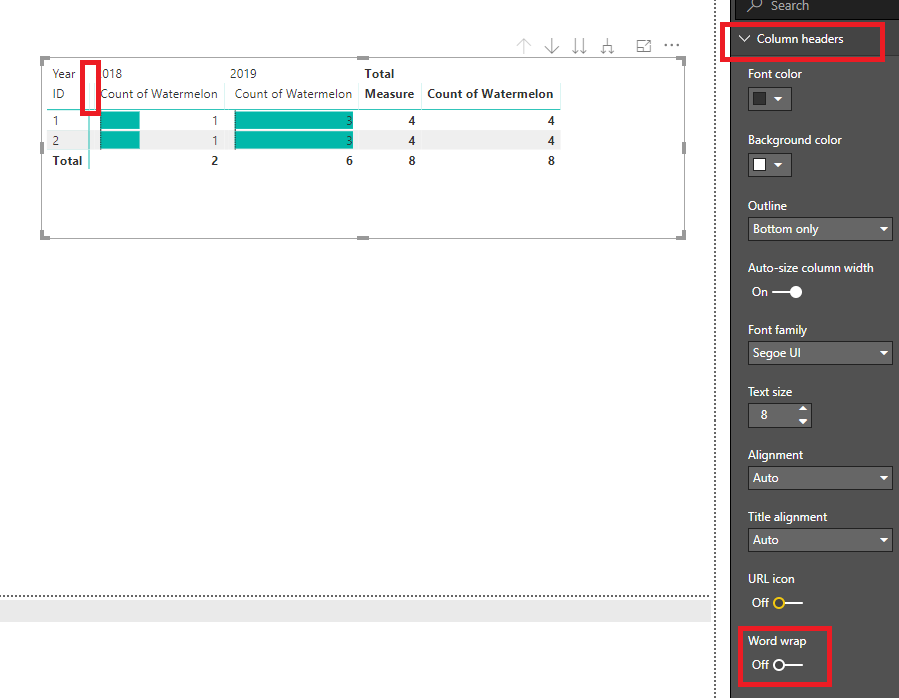
You may turn off the 'Word wrap' under 'Column headers'.Then drag the column manually to hide it.
Regards,
Hi @rvcedd
You may try to create a measure to replace "Count of butterflies"
Measure =
IF (
ISFILTERED ( Sheet1[Date].[Year] ) || ISFILTERED ( Sheet1[Date].[Month] )
|| ISFILTERED ( Sheet1[Date].[Day] ),
BLANK (),
CALCULATE ( COUNT ( Sheet1[Butterflies] ), ALL ( Sheet1[Date] ) )
)
Regards,
Hello,
Thanks for your reply. This solution doesn't solve the problem as the new created Measure still appears as a separate column in the table (it is empty but it still there). Is there any other solution?
Thanks,
Robert
Hi @rvcedd
You may turn off the 'Word wrap' under 'Column headers'.Then drag the column manually to hide it.
Regards,
Thanks. This is a good work around and I will accept it as a solution. It would be nice if this was a supported feature, do you know if this has been raised already or shall I submit a suggestion for improvement?
Check out the April 2026 Power BI update to learn about new features.
If you have recently started exploring Fabric, we'd love to hear how it's going. Your feedback can help with product improvements.
A new Power BI DataViz World Championship is coming this June! Don't miss out on submitting your entry.
| User | Count |
|---|---|
| 41 | |
| 37 | |
| 32 | |
| 20 | |
| 15 |
| User | Count |
|---|---|
| 66 | |
| 58 | |
| 31 | |
| 25 | |
| 24 |