
Get certified for free when you join Fabric Data Days 2026 and dive into Fabric, Power BI, SQL, AI, and other essential data skills.
Join nowJuly 7 - July 17 | Round 2 of the Power BI Dataviz World Championships. Don't miss your chance! Learn more
Hello there,
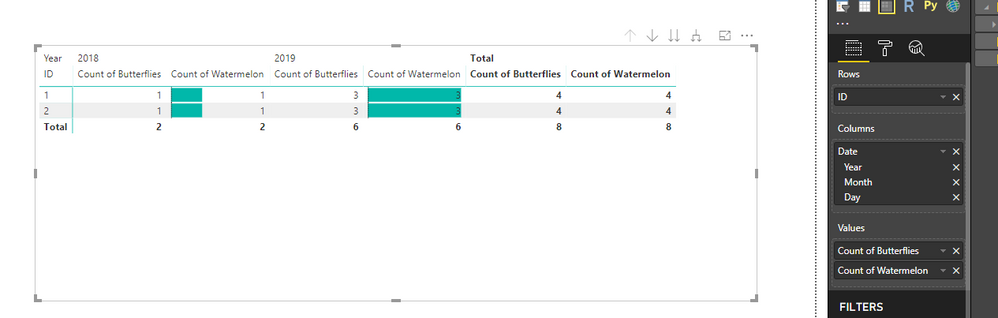
I would like to create a Matrix with 1 row, 3 columns (Date hierarchy) and 2 values. One of the values should be broken down by each column and one of the values should only display the total across all columns.
In the example attached, I would like to only display "Count of butterflies" in the Total column. The "Count of butterflies" from 2018 and 2019 columns should dissapear.
Is this possible?
Dashboard here: here
Solved! Go to Solution.
Hi @rvcedd
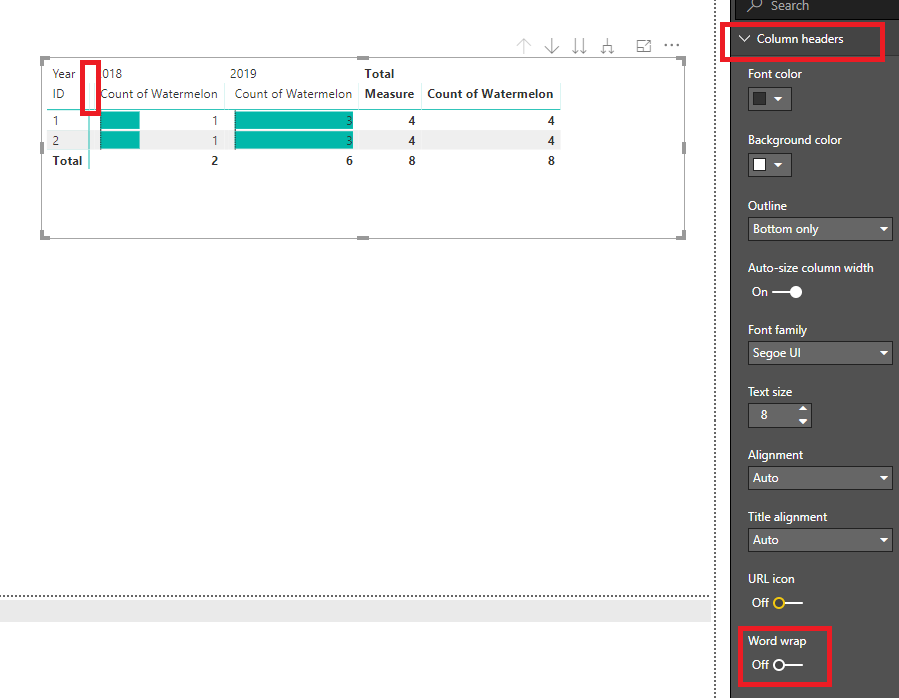
You may turn off the 'Word wrap' under 'Column headers'.Then drag the column manually to hide it.
Regards,
Hi @rvcedd
You may try to create a measure to replace "Count of butterflies"
Measure =
IF (
ISFILTERED ( Sheet1[Date].[Year] ) || ISFILTERED ( Sheet1[Date].[Month] )
|| ISFILTERED ( Sheet1[Date].[Day] ),
BLANK (),
CALCULATE ( COUNT ( Sheet1[Butterflies] ), ALL ( Sheet1[Date] ) )
)
Regards,
Hello,
Thanks for your reply. This solution doesn't solve the problem as the new created Measure still appears as a separate column in the table (it is empty but it still there). Is there any other solution?
Thanks,
Robert
Hi @rvcedd
You may turn off the 'Word wrap' under 'Column headers'.Then drag the column manually to hide it.
Regards,
Thanks. This is a good work around and I will accept it as a solution. It would be nice if this was a supported feature, do you know if this has been raised already or shall I submit a suggestion for improvement?
Join us in Barcelona for FabCon and SQLCon, the Fabric, Power BI, SQL, and AI community event. Save €200 with code FABCMTY200.
If you love stickers, then you will definitely want to check out our community sticker challenge, Barcelona edition!
Check out the July 2026 Power BI update to learn about new features.
| User | Count |
|---|---|
| 29 | |
| 23 | |
| 23 | |
| 22 | |
| 14 |
| User | Count |
|---|---|
| 48 | |
| 33 | |
| 20 | |
| 18 | |
| 16 |