cancel
Showing results for 
Search instead for 
Did you mean: 

July 7 - July 17 | Round 2 of the Power BI Dataviz World Championships. Don't miss your chance! Learn more

Reply
TabathaN
Advocate III
Advocate III

Matrix Auto-Size Not Working Correctly

I cannot share my file due to privacy issues so hopefully all of these screenshots will be helpful.


Example #1

There are no visual or page level filters set, no slicers and the column auto-size is set to "On". From this veiw everything looks like it's working correctly, especially since the number of characters in the total row are greater than the ones of the column header.auto-size example #1.jpg


Example #2

I have added one page level filter to example #1 and the column auto-size remains "On". You can see here that the auto-sizing breaks and does not format the May column correctly.
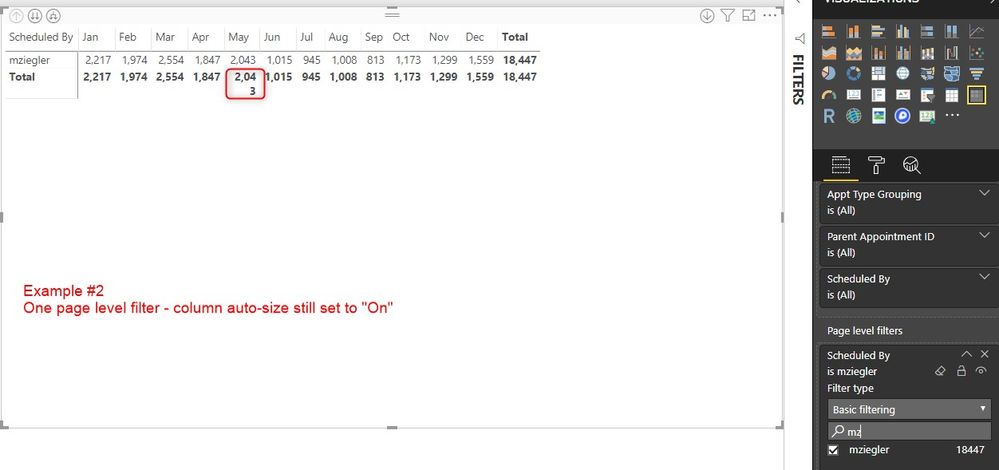
auto-size example #2.jpg


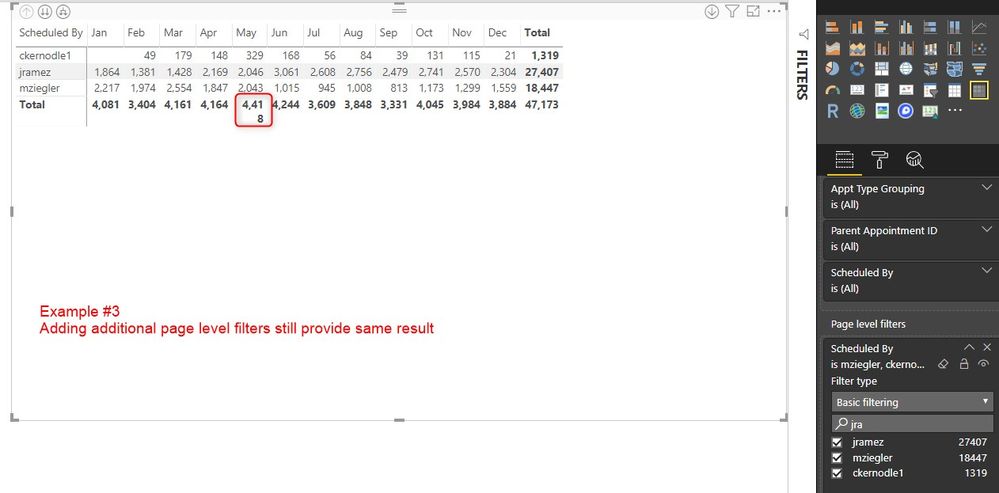
Example #3

Adding additional selections to the page level filter still provides the same result as example #2auto-size example #3.jpg


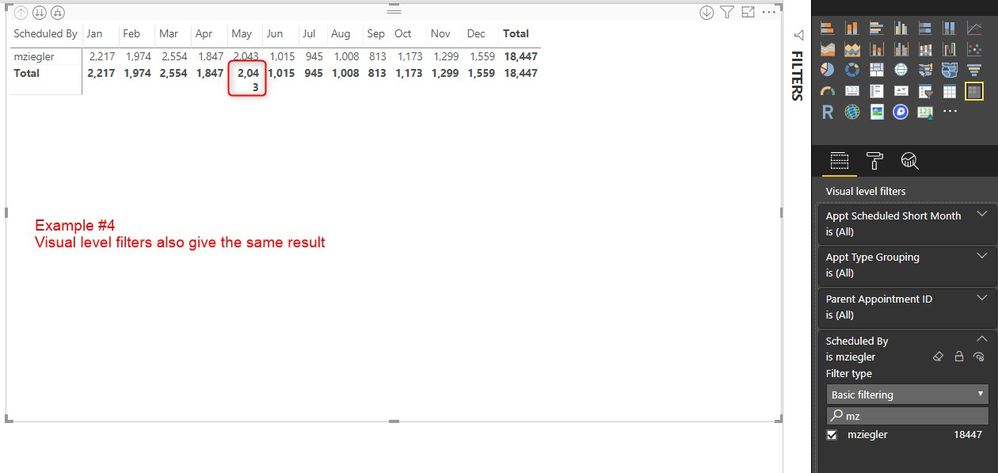
Example #4

Clearing the page level filter and using a visual level filter provides the same resultauto-size example #4.jpg


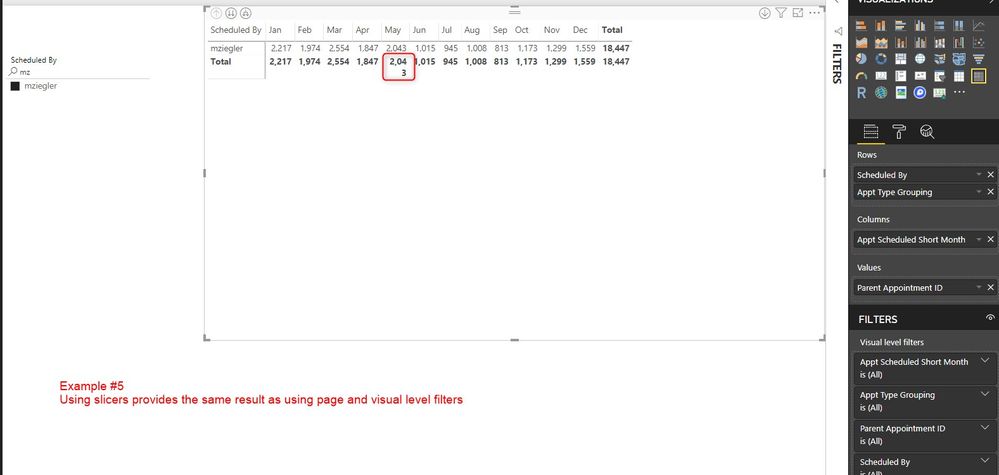
Example #5

Clearing page and visual level filters and using slicers also results in the same outcome.auto-size example #5.jpg


I have searched in the fourm for answers to this and have looked at any possible formatting selection I could make to correct this (I'm still new to PBI so that doesn't mean a whole lot lol) but I cannot figure it out.


Does anyone know how to fix this? It seems as though it's the filters causing the issue...?


Supplementary Information:

The value column is a count of the "parent appointment ID" which is a numerical (whole) number.

I have had this happen on more than one occassion in more than one page.

My desktop PBI is current - Version: 2.65.5313.841 64-bit (December 2018)

If I manually adjust the May column and go up or down a level the column will revert back to the wrong format where the total does not fit as seen in examples 2-5

2 REPLIES 2
Greg_Deckler
Community Champion
Community Champion

Have you tried turning the auto-sizing to off? Then manually set your column widths to their maximum expected size. Not great necessarily but I think that should work.


Follow on LinkedIn
@ me in replies or I'll lose your thread!!!
Instead of a Kudo, please vote for this idea
Become an expert!: Enterprise DNA
External Tools: MSHGQM
YouTube Channel!: Microsoft Hates Greg
Latest book!:
DAX For Humans

DAX is easy, CALCULATE makes DAX hard...

@Greg_Deckler

I have but unfortunatley the numbers can vary so much from level to level depending on what filters are in place that I don't feel like this is an adequate solution 😞

I really feel like this is some type of bug but was hoping there was an easy answer out there that would solve the auto-sizing issue so I won't have to make these chages all the time.

Helpful resources

Announcements
FabCon and SQLCon Barcelona 2026

FabCon & SQLCon – Barcelona 2026

Join us in Barcelona for FabCon and SQLCon, the Fabric, Power BI, SQL, and AI community event. Save €200 with code FABCMTY200.

Fabric Community Sticker Design Challenge Barcelona Carousel

Fabric Community Sticker Challenge - Barcelona 2026

If you love stickers, then you will definitely want to check out our community sticker challenge, Barcelona edition!

July Power BI Update Carousel

Power BI Monthly Update - July 2026

Check out the July 2026 Power BI update to learn about new features.

Power BI DataViz World Championships carousel

Power BI DataViz World Championships - June 2026

A new Power BI DataViz World Championship is coming this June! Don't miss out on submitting your entry.

Top Solution Authors
Users online (1,352)