Get certified for free when you join Fabric Data Days 2026 and dive into Fabric, Power BI, SQL, AI, and other essential data skills.
Join nowData Days is here! Join us now for 60+ days of learning, challenges, and connection. Learn more
Hi,
I was wondering if it is possible to create a sort of matricial dot plot (I'm not even sure than means something 😉 )
Concretely, I have persons who send messages at certain hours. I would like to have my liste of persons in X axis, all my hours in Y axis and a dot when a person send a message at the corresponding hour.
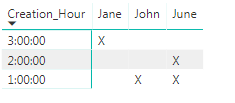
Should look like that:
3 pm x
2 pm x
1 pm x x
John Jane June
Does someone have an idea how to do that?
Thanks!
Océane
Solved! Go to Solution.
Hi Océane,
Yep I've this working for me.
Firstly create a measure - please change "Table1" to whatever your table is called:
Measure = if(COUNTROWS(Table1)>0,"X","")
Now in Power BI select the "Matrix" visualisation.
Put "Creation_Hour" as the row, "Posting_Author" as the column and the new measure as your "Values".
Hope that helps,
Alex
Hi Océane,
What does your data look like at the moment?
Can you provide a sample?
Thanks
Alex
I have 3 columns that matter :
ID_Post ; Creation_Hour ; Posting_Author
Every line is for a different post. I can have several hours for a single person (several persons for one hour is unlikely but theoretically possible)
For example, I would have
1 ; 1:00:00 ; John
2 ; 3:00:00 ; Jane
3 ; 1:00:00 ; June
4 ; 2:00:00 ; June
Hi Océane,
Yep I've this working for me.
Firstly create a measure - please change "Table1" to whatever your table is called:
Measure = if(COUNTROWS(Table1)>0,"X","")
Now in Power BI select the "Matrix" visualisation.
Put "Creation_Hour" as the row, "Posting_Author" as the column and the new measure as your "Values".
Hope that helps,
Alex
Thank you!
Actually, I was hoping for something with dots, more like a dot plot but with hours in Y axis instead of just number for scale.
Do you think that possible?
But if not, your solution works 🙂
Océane
I've had a look (and also at some custom visuals), but I can't see a way of doing what you're trying!
Maybe someone else will know a way.
Thanks,
Alex
Don't miss out on Data Days, June 15 through August 7. Learn Fabric, Power BI, SQL, AI and more.
Check out the May 2026 Power BI update to learn about new features.
| User | Count |
|---|---|
| 23 | |
| 21 | |
| 20 | |
| 18 | |
| 13 |
| User | Count |
|---|---|
| 58 | |
| 51 | |
| 38 | |
| 31 | |
| 26 |