Get certified for free when you join Fabric Data Days 2026 and dive into Fabric, Power BI, SQL, AI, and other essential data skills.
Join nowJuly 7 - July 17 | Round 2 of the Power BI Dataviz World Championships. Don't miss your chance! Learn more
Hi,
I was wondering if it is possible to create a sort of matricial dot plot (I'm not even sure than means something 😉 )
Concretely, I have persons who send messages at certain hours. I would like to have my liste of persons in X axis, all my hours in Y axis and a dot when a person send a message at the corresponding hour.
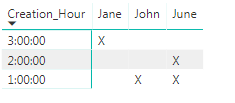
Should look like that:
3 pm x
2 pm x
1 pm x x
John Jane June
Does someone have an idea how to do that?
Thanks!
Océane
Solved! Go to Solution.
Hi Océane,
Yep I've this working for me.
Firstly create a measure - please change "Table1" to whatever your table is called:
Measure = if(COUNTROWS(Table1)>0,"X","")
Now in Power BI select the "Matrix" visualisation.
Put "Creation_Hour" as the row, "Posting_Author" as the column and the new measure as your "Values".
Hope that helps,
Alex
Hi Océane,
What does your data look like at the moment?
Can you provide a sample?
Thanks
Alex
I have 3 columns that matter :
ID_Post ; Creation_Hour ; Posting_Author
Every line is for a different post. I can have several hours for a single person (several persons for one hour is unlikely but theoretically possible)
For example, I would have
1 ; 1:00:00 ; John
2 ; 3:00:00 ; Jane
3 ; 1:00:00 ; June
4 ; 2:00:00 ; June
Hi Océane,
Yep I've this working for me.
Firstly create a measure - please change "Table1" to whatever your table is called:
Measure = if(COUNTROWS(Table1)>0,"X","")
Now in Power BI select the "Matrix" visualisation.
Put "Creation_Hour" as the row, "Posting_Author" as the column and the new measure as your "Values".
Hope that helps,
Alex
Thank you!
Actually, I was hoping for something with dots, more like a dot plot but with hours in Y axis instead of just number for scale.
Do you think that possible?
But if not, your solution works 🙂
Océane
I've had a look (and also at some custom visuals), but I can't see a way of doing what you're trying!
Maybe someone else will know a way.
Thanks,
Alex
Join us in Barcelona for FabCon and SQLCon, the Fabric, Power BI, SQL, and AI community event. Save €200 with code FABCMTY200.
Join Data Days 2026: 60 days of free live/on-demand sessions, challenges, study groups, and certification opportunities.
| User | Count |
|---|---|
| 28 | |
| 27 | |
| 25 | |
| 22 | |
| 18 |
| User | Count |
|---|---|
| 52 | |
| 49 | |
| 43 | |
| 36 | |
| 36 |