Join us in Barcelona for FabCon and SQLCon, September 28 - October 1, 2026.
This is best Fabric, Power BI, SQL and AI community event. How do we know? The last event sold out! Save €200 with code FABCMTY200.
Register now- Power BI forums
- Get Help with Power BI
- Desktop
- Service
- Report Server
- Power Query
- Mobile Apps
- Developer
- DAX Commands and Tips
- Custom Visuals Development Discussion
- Health and Life Sciences
- Power BI Spanish forums
- Translated Spanish Desktop
- Training and Consulting
- Instructor Led Training
- Dashboard in a Day for Women, by Women
- Galleries
- Data Stories Gallery
- Themes Gallery
- Contests Gallery
- QuickViz Gallery
- Quick Measures Gallery
- Visual Calculations Gallery
- Fabric Apps Gallery
- Notebook Gallery
- Translytical Task Flow Gallery
- TMDL Gallery
- R Script Showcase
- Webinars and Video Gallery
- Ideas
- Custom Visuals Ideas (read-only)
- Issues
- Issues
- Events
- Upcoming Events
July 28 - August 9 | Final Round of the Power BI Dataviz World Championships. This is your chance. Learn more
- Power BI forums
- Forums
- Get Help with Power BI
- Desktop
- Re: Matching transactions
- Subscribe to RSS Feed
- Mark Topic as New
- Mark Topic as Read
- Float this Topic for Current User
- Bookmark
- Subscribe
- Printer Friendly Page


- Mark as New
- Bookmark
- Subscribe
- Mute
- Subscribe to RSS Feed
- Permalink
- Report Inappropriate Content
Matching transactions
Hello,
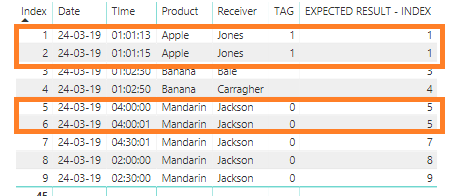
Can someone help me with the follow analyse?
I need to find matching rows, the conditions are the follow.
Date > equal
Product > equal
Receiver > equal
TAG > equal
Time > time frame of 2 minutes
The orange lines are matching rows. The result is the min value of the index colum.
Greets,
Ronald
Power bi file
Solved! Go to Solution.


- Mark as New
- Bookmark
- Subscribe
- Mute
- Subscribe to RSS Feed
- Permalink
- Report Inappropriate Content
Try this Custom Column
Please takle a look at attached file
=let myproduct=[Product], myreceiver=[Receiver],mytag=[TAG],mydate=[Date], mytime=[TIme2] in
List.Min(Table.SelectRows(#"Changed Type1",each [Product]=myproduct and [Receiver]=myreceiver and [Date]=mydate and [TAG]=mytag and Number.Abs((Duration.TotalMinutes(Duration.From([TIme2]))-Duration.TotalMinutes(Duration.From(mytime))))<=2)[Index])
Regards
Zubair
Please try my custom visuals
- Mark as New
- Bookmark
- Subscribe
- Mute
- Subscribe to RSS Feed
- Permalink
- Report Inappropriate Content
Hi @Ronald123
My apologies for not getting back earlier
Try this DAX column. It works with sample data.
See if it performs better than M custom column
Calculated Column =
CALCULATE (
    MIN ( Test[Index] ),
    FILTER (
        Test,
        [Product] = EARLIER ( [Product] )
            && [Receiver] = EARLIER ( [Receiver] )
            && [Date] = EARLIER ( [Date] )
            && [TAG] = EARLIER ( [TAG] )
            && ABS ( [TIme] - EARLIER ( [TIme] ) )
                <= TIME ( 0, 2, 0 )
    )
)
Regards
Zubair
Please try my custom visuals
- Mark as New
- Bookmark
- Subscribe
- Mute
- Subscribe to RSS Feed
- Permalink
- Report Inappropriate Content
Try this Custom Column
=let myproduct=[Product], myreceiver=[Receiver] in
List.Min(Table.SelectRows(#"Added Index",each [Product]=myproduct and [Receiver]=myreceiver)[Index])
Regards
Zubair
Please try my custom visuals
- Mark as New
- Bookmark
- Subscribe
- Mute
- Subscribe to RSS Feed
- Permalink
- Report Inappropriate Content
Thx for the reply either i'm missing some calculating conditions;
Date must be equal
Tag must be equal
Time - time frame of 2 minutes
Greets,
Ronald
- Mark as New
- Bookmark
- Subscribe
- Mute
- Subscribe to RSS Feed
- Permalink
- Report Inappropriate Content
My bad  I didn't look at your question carefully.
Just looked at the picture.
Will get back to you
Regards
Zubair
Please try my custom visuals
- Mark as New
- Bookmark
- Subscribe
- Mute
- Subscribe to RSS Feed
- Permalink
- Report Inappropriate Content
Try this Custom Column
Please takle a look at attached file
=let myproduct=[Product], myreceiver=[Receiver],mytag=[TAG],mydate=[Date], mytime=[TIme2] in
List.Min(Table.SelectRows(#"Changed Type1",each [Product]=myproduct and [Receiver]=myreceiver and [Date]=mydate and [TAG]=mytag and Number.Abs((Duration.TotalMinutes(Duration.From([TIme2]))-Duration.TotalMinutes(Duration.From(mytime))))<=2)[Index])
Regards
Zubair
Please try my custom visuals
- Mark as New
- Bookmark
- Subscribe
- Mute
- Subscribe to RSS Feed
- Permalink
- Report Inappropriate Content
I use the Power Query you've made in a calculation for a Google Big Query project.
The Google Big Query is created with a SQL with a max of 100.000 lines.
Either the Power Query calculation calculate over the more than 20 milion lines.
Also checked with a CSV with 100.000 lines with a total of 10 mb.
The query is running a quarter with a total of 12 GB loaded in the model.
Is there a solution for this issue?
Greets,
Ronald
- Mark as New
- Bookmark
- Subscribe
- Mute
- Subscribe to RSS Feed
- Permalink
- Report Inappropriate Content
Try Table.Buffer,
IN the Query Editor>>View>>advanced editor
In the step just before the step in which custom column was added, try wrapping the code inside Table.Buffer
For example in the file I shared
    #"Changed Type1" = Table.Buffer(Table.TransformColumnTypes(#"Duplicated Column",{{"TIme2", type number}})),
    #"Added Custom1" = Table.AddColumn(#"Changed Type1", "Custom.1", each let myproduct=[Product], myreceiver=[Receiver],mytag=[TAG],mydate=[Date], mytime=[TIme2] in
List.Min(Table.SelectRows(#"Changed Type1",each [Product]=myproduct and [Receiver]=myreceiver and [Date]=mydate and [TAG]=mytag and Number.Abs((Duration.TotalMinutes(Duration.From([TIme2]))-Duration.TotalMinutes(Duration.From(mytime))))<=2)[Index]))
in
    #"Added Custom1"
Regards
Zubair
Please try my custom visuals
- Mark as New
- Bookmark
- Subscribe
- Mute
- Subscribe to RSS Feed
- Permalink
- Report Inappropriate Content
Tanks for you're reply but table.buffer doesn't help.
In Power Query is't possible to run the calculation but is isn't possible to apply the query in the model.
On my personal computer i have memory issue's with this calculation and the server of my work is runing and runing...
Is there an another option? Maybe DAX?
Greets,
Ronald
- Mark as New
- Bookmark
- Subscribe
- Mute
- Subscribe to RSS Feed
- Permalink
- Report Inappropriate Content
I will look into it
Regards
Zubair
Please try my custom visuals
- Mark as New
- Bookmark
- Subscribe
- Mute
- Subscribe to RSS Feed
- Permalink
- Report Inappropriate Content
- Mark as New
- Bookmark
- Subscribe
- Mute
- Subscribe to RSS Feed
- Permalink
- Report Inappropriate Content
Hi @Ronald123
My apologies for not getting back earlier
Try this DAX column. It works with sample data.
See if it performs better than M custom column
Calculated Column =
CALCULATE (
    MIN ( Test[Index] ),
    FILTER (
        Test,
        [Product] = EARLIER ( [Product] )
            && [Receiver] = EARLIER ( [Receiver] )
            && [Date] = EARLIER ( [Date] )
            && [TAG] = EARLIER ( [TAG] )
            && ABS ( [TIme] - EARLIER ( [TIme] ) )
                <= TIME ( 0, 2, 0 )
    )
)
Regards
Zubair
Please try my custom visuals
- Mark as New
- Bookmark
- Subscribe
- Mute
- Subscribe to RSS Feed
- Permalink
- Report Inappropriate Content

Helpful resources

FabCon & SQLCon – Barcelona 2026
Join us in Barcelona for FabCon and SQLCon, the Fabric, Power BI, SQL, and AI community event. Save €200 with code FABCMTY200.

Fabric Community Sticker Challenge - Barcelona 2026
If you love stickers, then you will definitely want to check out our community sticker challenge, Barcelona edition!

Power BI Monthly Update - July 2026
Check out the July 2026 Power BI update to learn about new features.

Power BI DataViz World Championships - June 2026
A new Power BI DataViz World Championship is coming this June! Don't miss out on submitting your entry.

| User | Count |
|---|---|
| 25 | |
| 23 | |
| 20 | |
| 18 | |
| 14 |


| User | Count |
|---|---|
| 24 | |
| 20 | |
| 20 | |
| 20 | |
| 19 |


