Get certified for free when you join Fabric Data Days 2026 and dive into Fabric, Power BI, SQL, AI, and other essential data skills.
Join nowData Days is here! Join us now for 60+ days of learning, challenges, and connection. Learn more
Hello,
I am following a LinkedIn tutorial regarding Power BI, and the tutorial uses online sample dashboard "Retail Analysis Sample".
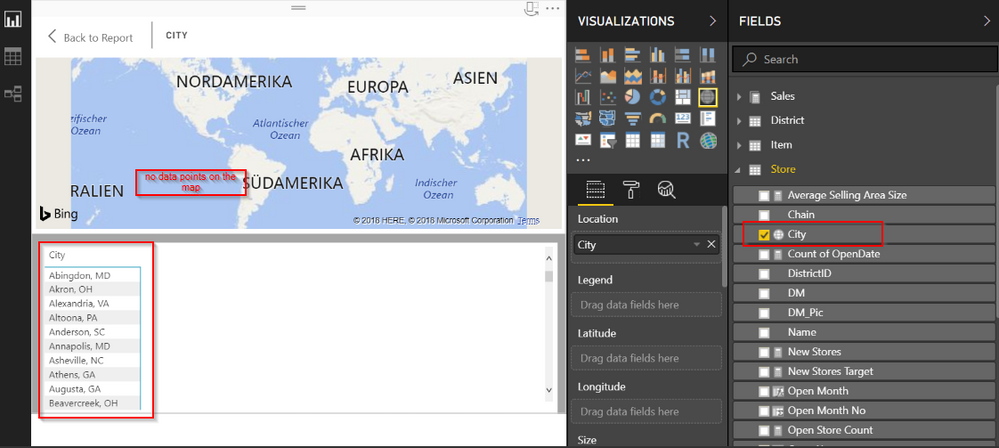
The problem I am having is with displaying data points in case when I want to create a new report. After dragging and dropping a map icon and CITY object to the canvas the map is shown but no data is shown.
(By right-clicking on the map and choosing "Show Data" I can see the data in table form.)
Did anyone face similar issues?
Thank you!
Solved! Go to Solution.
Hi @cartessius,
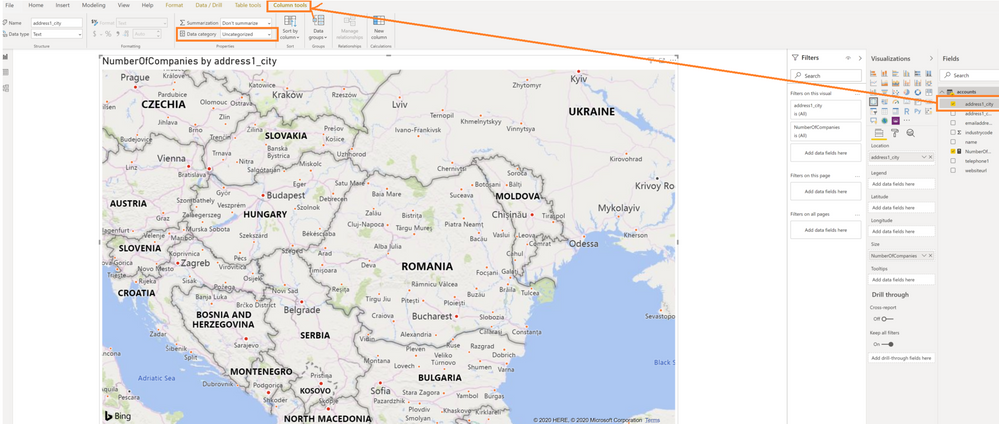
By my tests, if you change the Data Category of the City column to be Place, it will show successfully.
Best Regards,
Cherry
In the latest version of Power BI Desktop the data category is selected from here:
Hello,
I am using a sample Power BI application "Retail Analysis Sample" while following a Linkedin tutorial about Power BI.
When I drag-and-drop CITY field to a canvas, the map i shown but no data poins are shown.
Data points are shown neither on powerbi.com nor on Power BI desktop.
I first though the problem is with regional settings - decimal point vs comma - however, that does not seem to be a case.
Anyone has any idea on how to show data points with the sample data?
Thank you!
Hi @cartessius,
By my tests, if you change the Data Category of the City column to be Place, it will show successfully.
Best Regards,
Cherry
Thank you @v-piga-msft !
The data is shown on the map by selecting the data category as Places.
Have a great day!
Hi @cartessius,
I can reproduce this issue in Power BI Desktop and Power BI Service, I will report it internally and post back once I get any updates.
Regards,
Daniel He
Hello @v-danhe-msft,
Thank you for your message. Cherry helped me with her suggestion (changing the data category to Places).
Cheers!
Don't miss out on Data Days, June 15 through August 7. Learn Fabric, Power BI, SQL, AI and more.
Check out the May 2026 Power BI update to learn about new features.
| User | Count |
|---|---|
| 22 | |
| 21 | |
| 20 | |
| 17 | |
| 13 |
| User | Count |
|---|---|
| 58 | |
| 50 | |
| 37 | |
| 29 | |
| 24 |