This time we’re going bigger than ever. Fabric, Power BI, SQL, AI and more. We're covering it all. You won't want to miss it.
Learn moreDid you hear? There's a new SQL AI Developer certification (DP-800). Start preparing now and be one of the first to get certified. Register now
Hello,
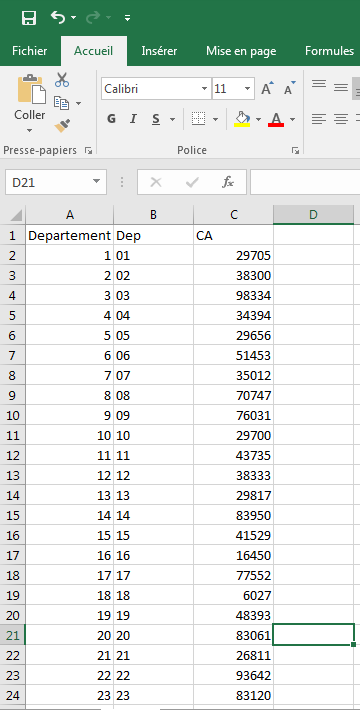
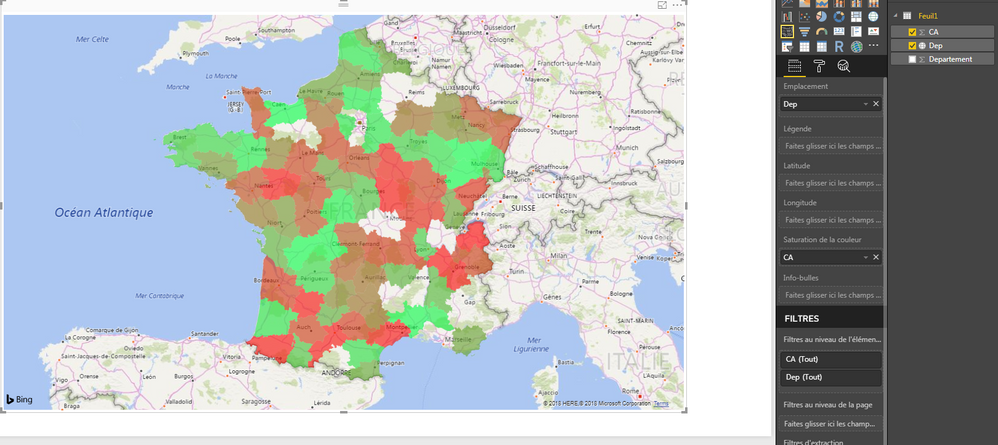
I'm new to Power BI. I am using an excel file that contains the departements et the turnover fields. I tried to visualize the departements on the map with the turnover as color saturation but not all departments are shown on the map.
Can someone please help?
Thanks.
Hi Tatynout,
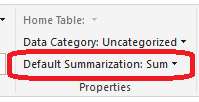
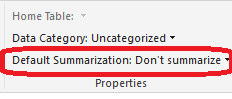
Click Modeling-> Default Summarization, choose Don't summarize and try again.
Regards,
Jimmy Tao
Hi @v-yuta-msft,
Thanks for your reply. I tried and it still does not work. I am asking myself if it is not a bug in the new version of Power BI Desktop cuz it was working perfectly some days ago but as soon as i updated the version i had, i encountered this issue.
Regards,
Tatiana Nouteping.
Hi Tatynout,
Please use the full name of country or region and try again. Some abbreviation may not be recognized by the map visual.
Regards,
Jimmy Tao
Check out the April 2026 Power BI update to learn about new features.
If you have recently started exploring Fabric, we'd love to hear how it's going. Your feedback can help with product improvements.
| User | Count |
|---|---|
| 36 | |
| 32 | |
| 31 | |
| 21 | |
| 15 |
| User | Count |
|---|---|
| 68 | |
| 57 | |
| 31 | |
| 29 | |
| 22 |