The issue I'm having is that I have 3 tables that aren't filtering with the RLS roles I have set. I have the tables setup like this:

On the report I have a table displaying the details from the Contract_Details table (there are more columns in that table that aren't shown in the picture). The Rebate_Header has an entry for each contract and the User_Contracts table has an entry for each RebateID and associated email address.
What I want to do is filter the contracts that appear depending on the logged-in using their UPN. I have defined a role that filters based on UPN like this:
[emailaddress] = Username()
When I try to view as the role I defined, the data in my table doesn't change; however, the data in the User_Contracts table is getting filtered.
The table in my report changes for the role when I have the tables setup like this:
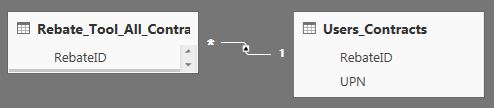
The issue is that I don't have unique RebateID's in the User_Contracts table, so this method isn't working for me. Would anyone know how to resolve this?


