We've captured the moments from FabCon & SQLCon that everyone is talking about, and we are bringing them to the community, live and on-demand. Starts on April 14th. Register now
Hi all,
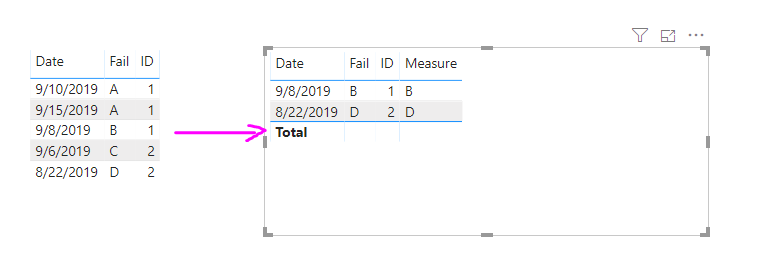
I have a table with the following data:
I want to visualizate in a page, a table with the next info extracted from the previous table. (First date and its fail for each ID) What page filters or visual filters should I add in order to view the following table?
Thanks
Solved! Go to Solution.
Hi @amateu
Please use below measure:
Measure = var a = CALCULATE(MIN('Table (2)'[Date]),ALLEXCEPT('Table (2)','Table (2)'[ID]))
Return
IF(a=MAX('Table (2)'[Date]),CALCULATE(MAX('Table (2)'[Fail]),FILTER('Table (2)',[Date]=a)),BLANK())
Hi @amateu
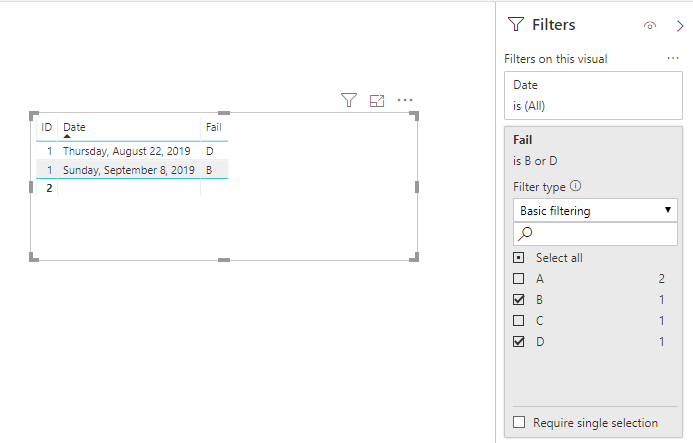
I don't quite understand your logic about the filter. it's based on the most minium date by ID? If yes, you'll need a measure.
If just simply filter B&D , you can sue the filter pane.
I need that the app tell me the first fail, this is an example but in reality I will not know what the fail is. How can I do it by the measure you say?
Thanks
Hi @amateu
Please use below measure:
Measure = var a = CALCULATE(MIN('Table (2)'[Date]),ALLEXCEPT('Table (2)','Table (2)'[ID]))
Return
IF(a=MAX('Table (2)'[Date]),CALCULATE(MAX('Table (2)'[Fail]),FILTER('Table (2)',[Date]=a)),BLANK())
If you have recently started exploring Fabric, we'd love to hear how it's going. Your feedback can help with product improvements.
A new Power BI DataViz World Championship is coming this June! Don't miss out on submitting your entry.
Share feedback directly with Fabric product managers, participate in targeted research studies and influence the Fabric roadmap.
| User | Count |
|---|---|
| 57 | |
| 38 | |
| 33 | |
| 19 | |
| 16 |
| User | Count |
|---|---|
| 68 | |
| 66 | |
| 41 | |
| 34 | |
| 25 |