Learn from the best! Meet the four finalists headed to the FINALS of the Power BI Dataviz World Championships! Register now
Hi,
I have created a date table with the year 2016 - 2017. It has a column for the year, month, week, and day.
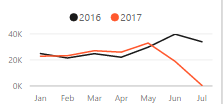
I use the chiclet filter in my report. So the user chooses the month, year, and week separately. When a July filter is chosen and the year is filtered for 2016 and 2017; the data shows the complete month last year, and only partial for the current year. How do I show month to date for last year?
Hi @Anonymous,
Suppose you have created a one to many relationship between source table and date table. To compare MTD value in currect year and previous year, you could refer to below measures:
TY MTD = CALCULATE(SUM('MTD'[SalesAmount]),DATESMTD('Date table'[Date]))
LY MTD = CALCULATE([TY MTD],SAMEPERIODLASTYEAR('Date table'[Date].[Date]))
Here is a blog for your reference: Power BI Tips: Calculating Year To Date Values
Best regards,
Yuliana Gu
A new Power BI DataViz World Championship is coming this June! Don't miss out on submitting your entry.
Share feedback directly with Fabric product managers, participate in targeted research studies and influence the Fabric roadmap.
| User | Count |
|---|---|
| 47 | |
| 35 | |
| 27 | |
| 15 | |
| 15 |
| User | Count |
|---|---|
| 58 | |
| 56 | |
| 38 | |
| 21 | |
| 21 |