This is best Fabric, Power BI, SQL and AI community event. How do we know? The last event sold out! Save €200 with code FABCMTY200.
Register nowA new Data Days event is coming soon! This time we’re going bigger than ever. Fabric, Power BI, SQL, AI and more. Don't miss out.
Hi,
I have created a date table with the year 2016 - 2017. It has a column for the year, month, week, and day.
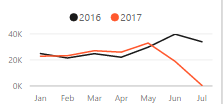
I use the chiclet filter in my report. So the user chooses the month, year, and week separately. When a July filter is chosen and the year is filtered for 2016 and 2017; the data shows the complete month last year, and only partial for the current year. How do I show month to date for last year?
Hi @Anonymous,
Suppose you have created a one to many relationship between source table and date table. To compare MTD value in currect year and previous year, you could refer to below measures:
TY MTD = CALCULATE(SUM('MTD'[SalesAmount]),DATESMTD('Date table'[Date]))
LY MTD = CALCULATE([TY MTD],SAMEPERIODLASTYEAR('Date table'[Date].[Date]))
Here is a blog for your reference: Power BI Tips: Calculating Year To Date Values
Best regards,
Yuliana Gu
Check out the May 2026 Power BI update to learn about new features.
Sign up to receive a private message when registration opens and key events begin.
If you have recently started exploring Fabric, we'd love to hear how it's going. Your feedback can help with product improvements.
| User | Count |
|---|---|
| 32 | |
| 25 | |
| 24 | |
| 24 | |
| 14 |
| User | Count |
|---|---|
| 61 | |
| 48 | |
| 27 | |
| 23 | |
| 20 |