cancel
Showing results for 
Search instead for 
Did you mean: 

July 28 - August 9 | Final Round of the Power BI Dataviz World Championships. This is your chance. Learn more

Reply
Vallirajap
Resolver III
Resolver III

MIN Function

We are noticing a differnce in behaviour when using the <datecolum> vs <datecolumn>.date 


In the below example, we tried the Min_Date calcualtion in two different ways.


Option Way 1: 

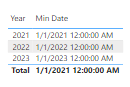
Min Date = MIN(OINV[DocDate].[Date])

Screenshot (76).png
 
Option Way 2:
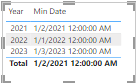
Min Date = MIN(OINV[DocDate])
Screenshot (78).png
 
Is there are fundamental difference when using <datecolumn>.date 
 
My understanding was it should just format. Any input or clarity on this will be helpful.
 
Thanks in advance, 
Valli Raja P
2 REPLIES 2
v-jingzhang
Community Support
Community Support

Hi @Vallirajap 


You may refer to Auto date/time in Power BI Desktop - Power BI | Microsoft Learn


The auto date/time is a data load option in Power BI Desktop. When the option is enabled, Power BI Desktop creates a hidden auto date/time table for each date column, providing all of the following conditions are true:

  • The table storage mode is Import
  • The column data type is date or date/time
  • The column isn't the "many" side of a model relationship


Auto date/time tables are permanently hidden, even from modelers. They don’t appear in the Fields pane or the Model view diagram, and its rows don’t appear in Data view. Also, the table and its column can’t be directly referenced by DAX expressions. If it were possible to see the rows of an auto date/time table, they would look similar to the following example. The example shows seven columns with 10 rows of data from January 1, 2019 to January 10, 2019.
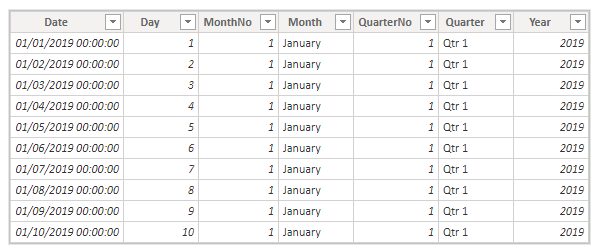
vjingzhang_1-1688004052233.png


If it were possible to see an auto date/time table in the Model view diagram, it would look like the following tables with related columns highlighted:
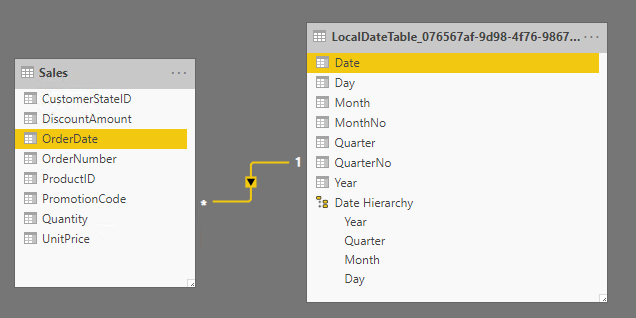
vjingzhang_2-1688004121245.png


When you use Min Date = MIN(OINV[DocDate].[Date]), while this measure expression is valid in Power BI Desktop, it's not correct DAX syntax. Internally, Power BI Desktop transposes your expression to reference the true (hidden) auto date/time table column.


So sometimes you may find the results are different when you reference a date column and when you reference a related hidden auto date/time table date column. 


Best Regards,
Community Support Team _ Jing
If this post helps, please Accept it as Solution to help other members find it.

Mahesh0016
Super User
Super User

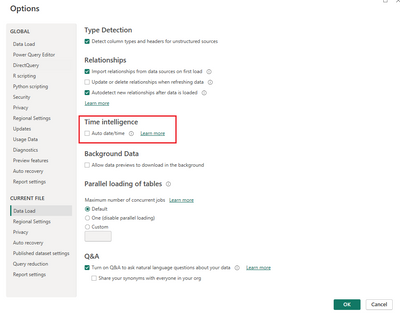
@Vallirajap Please uncheck Auto date/time in > file > option settings > Global&& Current file > Data load

Mahesh0016_2-1687844086688.png


Helpful resources

Announcements
FabCon and SQLCon Barcelona 2026

FabCon & SQLCon – Barcelona 2026

Join us in Barcelona for FabCon and SQLCon, the Fabric, Power BI, SQL, and AI community event. Save €200 with code FABCMTY200.

Fabric Community Sticker Design Challenge Barcelona Carousel

Fabric Community Sticker Challenge - Barcelona 2026

If you love stickers, then you will definitely want to check out our community sticker challenge, Barcelona edition!

July Power BI Update Carousel

Power BI Monthly Update - July 2026

Check out the July 2026 Power BI update to learn about new features.

Power BI DataViz World Championships carousel

Power BI DataViz World Championships - June 2026

A new Power BI DataViz World Championship is coming this June! Don't miss out on submitting your entry.

Top Solution Authors