Hi @Vallirajap
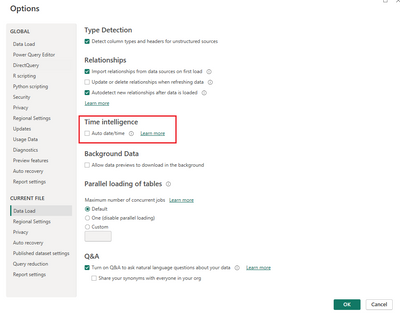
You may refer to Auto date/time in Power BI Desktop - Power BI | Microsoft Learn
The auto date/time is a data load option in Power BI Desktop. When the option is enabled, Power BI Desktop creates a hidden auto date/time table for each date column, providing all of the following conditions are true:
- The table storage mode is Import
- The column data type is date or date/time
- The column isn't the "many" side of a model relationship
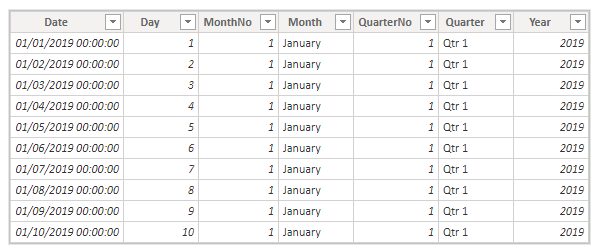
Auto date/time tables are permanently hidden, even from modelers. They don’t appear in the Fields pane or the Model view diagram, and its rows don’t appear in Data view. Also, the table and its column can’t be directly referenced by DAX expressions. If it were possible to see the rows of an auto date/time table, they would look similar to the following example. The example shows seven columns with 10 rows of data from January 1, 2019 to January 10, 2019.
If it were possible to see an auto date/time table in the Model view diagram, it would look like the following tables with related columns highlighted:
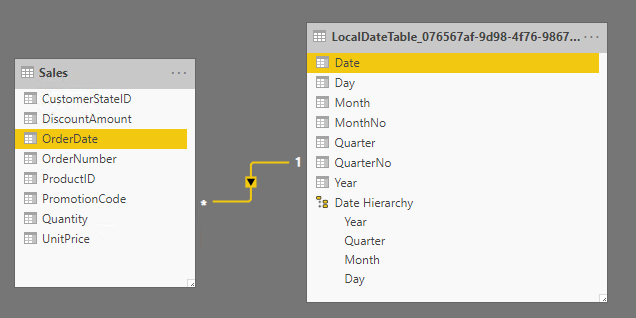
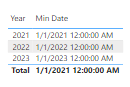
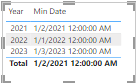
When you use Min Date = MIN(OINV[DocDate].[Date]), while this measure expression is valid in Power BI Desktop, it's not correct DAX syntax. Internally, Power BI Desktop transposes your expression to reference the true (hidden) auto date/time table column.
So sometimes you may find the results are different when you reference a date column and when you reference a related hidden auto date/time table date column.
Best Regards,
Community Support Team _ Jing
If this post helps, please Accept it as Solution to help other members find it.