Join us at FabCon Atlanta from March 16 - 20, 2026, for the ultimate Fabric, Power BI, AI and SQL community-led event. Save $200 with code FABCOMM.
Register now!The Power BI Data Visualization World Championships is back! Get ahead of the game and start preparing now! Learn more
I have created a line graph with data along a time point (set by text, not an actual date; i.e. week 1, week 2 etc), but if a series does not have a measurement for a time point that other series do have, the line breaks and re-starts again.
See the pictures below.
What I would like is for all points from a series to be joined until the last data point on that series.
This line is continuous
The pink line has a data point at a time that the grey line does not, so the grey line breaks rather than joing with a line across the points.
Solved! Go to Solution.
Hi @Mesh ,
One sample for your reference, please check the following steps as below.
1. Insert an index by week in power query like this.
let
Source = Table.FromRows(Json.Document(Binary.Decompress(Binary.FromText("Xc47EsAgCATQu1BbBNSYnMWxtMoBcv24foha6Mw+FIiR3pwfJkNcL0qmkZQkoEXYzoLgdhCZBWXbug/yqJd3TuXsElQCYjle5Rr7/N9u9MUADqvVgaLGx75nlb5o+gA=", BinaryEncoding.Base64), Compression.Deflate)), let _t = ((type text) meta [Serialized.Text = true]) in type table [week = _t, value1 = _t, value2 = _t]),
#"Changed Type" = Table.TransformColumnTypes(Source,{{"week", type text}, {"value1", Int64.Type}, {"value2", Int64.Type}}),
#"Added Index" = Table.AddIndexColumn(#"Changed Type", "Index", 1, 1),
#"Added Custom" = Table.AddColumn(#"Added Index", "Custom", each Text.Combine(List.RemoveNulls(List.Transform(Text.ToList([week]),each if Value.Is(Value.FromText(_), type number) then _ else null)))),
#"Changed Type1" = Table.TransformColumnTypes(#"Added Custom",{{"Custom", Int64.Type}})
in
#"Changed Type1"
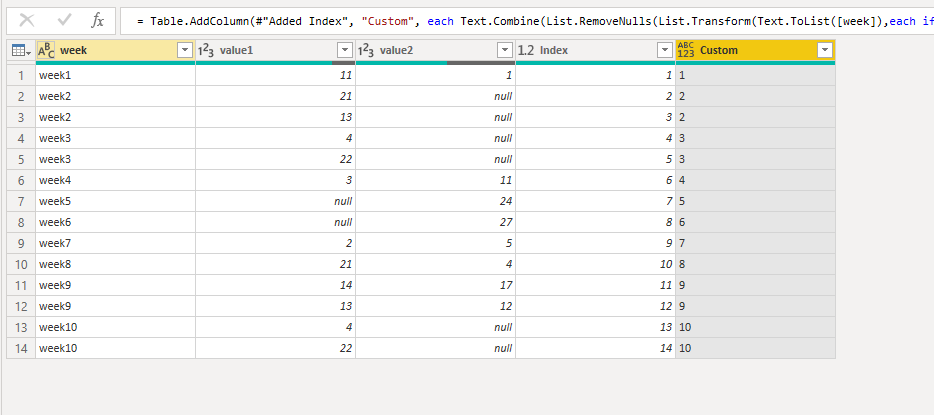
2. Then apply the query and we can create measures as below.
sumvalue1 = SUM('Table'[value1])
value2sum = var minind = CALCULATE(MIN('Table'[Custom]),FILTER(ALLSELECTED('Table'),[sumvalue1] = BLANK()))
var ind = minind-1
return
CALCULATE(SUM('Table'[value2]),FILTER('Table','Table'[Custom]>=ind))
Hi @Mesh ,
One sample for your reference, please check the following steps as below.
1. Insert an index by week in power query like this.
let
Source = Table.FromRows(Json.Document(Binary.Decompress(Binary.FromText("Xc47EsAgCATQu1BbBNSYnMWxtMoBcv24foha6Mw+FIiR3pwfJkNcL0qmkZQkoEXYzoLgdhCZBWXbug/yqJd3TuXsElQCYjle5Rr7/N9u9MUADqvVgaLGx75nlb5o+gA=", BinaryEncoding.Base64), Compression.Deflate)), let _t = ((type text) meta [Serialized.Text = true]) in type table [week = _t, value1 = _t, value2 = _t]),
#"Changed Type" = Table.TransformColumnTypes(Source,{{"week", type text}, {"value1", Int64.Type}, {"value2", Int64.Type}}),
#"Added Index" = Table.AddIndexColumn(#"Changed Type", "Index", 1, 1),
#"Added Custom" = Table.AddColumn(#"Added Index", "Custom", each Text.Combine(List.RemoveNulls(List.Transform(Text.ToList([week]),each if Value.Is(Value.FromText(_), type number) then _ else null)))),
#"Changed Type1" = Table.TransformColumnTypes(#"Added Custom",{{"Custom", Int64.Type}})
in
#"Changed Type1"
2. Then apply the query and we can create measures as below.
sumvalue1 = SUM('Table'[value1])
value2sum = var minind = CALCULATE(MIN('Table'[Custom]),FILTER(ALLSELECTED('Table'),[sumvalue1] = BLANK()))
var ind = minind-1
return
CALCULATE(SUM('Table'[value2]),FILTER('Table','Table'[Custom]>=ind))
The Power BI Data Visualization World Championships is back! Get ahead of the game and start preparing now!
| User | Count |
|---|---|
| 39 | |
| 37 | |
| 33 | |
| 32 | |
| 29 |
| User | Count |
|---|---|
| 133 | |
| 88 | |
| 85 | |
| 68 | |
| 64 |