We've captured the moments from FabCon & SQLCon that everyone is talking about, and we are bringing them to the community, live and on-demand. Starts on April 14th. Register now
Hi Power BI Community!
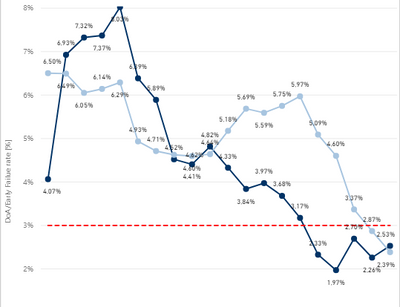
I have this line chart:
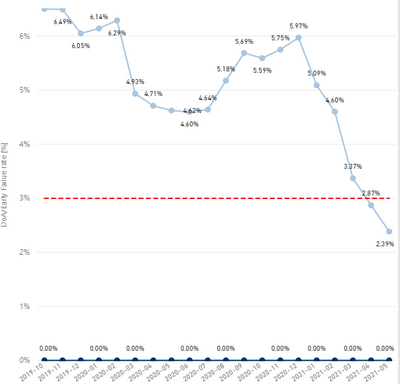
I have also a slicer to just show one of the line charts:
Is there a way to just show one chart with values? = No zero values.
I already tried Filter greater than 0 but then nothing is shown.
Thankx for your time.
Solved! Go to Solution.
Hi @Anonymous ,
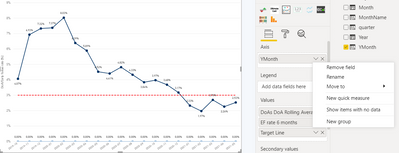
You can right click on your filed under "Axis" and de-select "Show items with no data". That should eliminate your zero line.
It should work with a filter as well. Not sure what's happening there. Can you share a screenshot of your filter?
Thanks,
Dheeraj
For your slicer, is this affecting a filter or a measure?
If you are using a measure, use an if statement with the result being BLANK() and this should remove the values from the chart.
Let me know how you get on!
@dkaushik Thanks for the reply but I already tried that:
Or this:
= No chart because if is zero than it filters everything also with other seetings on the filter
Hi @Anonymous ,
You can right click on your filed under "Axis" and de-select "Show items with no data". That should eliminate your zero line.
It should work with a filter as well. Not sure what's happening there. Can you share a screenshot of your filter?
Thanks,
Dheeraj
If you have recently started exploring Fabric, we'd love to hear how it's going. Your feedback can help with product improvements.
A new Power BI DataViz World Championship is coming this June! Don't miss out on submitting your entry.
| User | Count |
|---|---|
| 56 | |
| 40 | |
| 35 | |
| 18 | |
| 18 |
| User | Count |
|---|---|
| 69 | |
| 64 | |
| 38 | |
| 34 | |
| 23 |