Join us at FabCon Atlanta from March 16 - 20, 2026, for the ultimate Fabric, Power BI, AI and SQL community-led event. Save $200 with code FABCOMM.
Register now!Learn from the best! Meet the four finalists headed to the FINALS of the Power BI Dataviz World Championships! Register now
Hi Power BI Community!
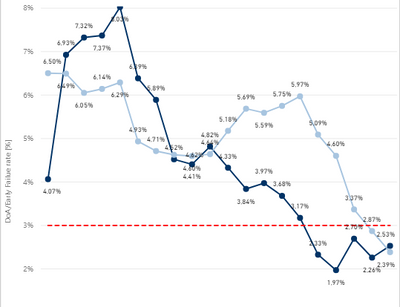
I have this line chart:
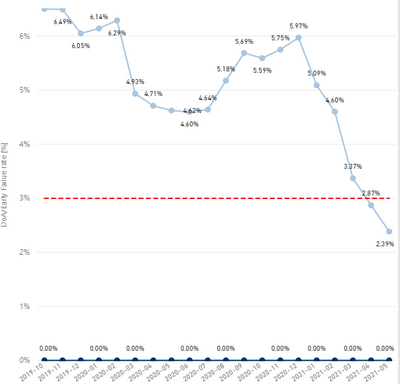
I have also a slicer to just show one of the line charts:
Is there a way to just show one chart with values? = No zero values.
I already tried Filter greater than 0 but then nothing is shown.
Thankx for your time.
Solved! Go to Solution.
Hi @Anonymous ,
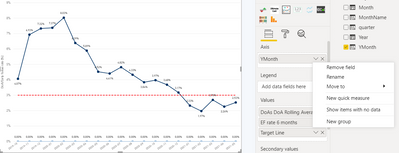
You can right click on your filed under "Axis" and de-select "Show items with no data". That should eliminate your zero line.
It should work with a filter as well. Not sure what's happening there. Can you share a screenshot of your filter?
Thanks,
Dheeraj
For your slicer, is this affecting a filter or a measure?
If you are using a measure, use an if statement with the result being BLANK() and this should remove the values from the chart.
Let me know how you get on!
@dkaushik Thanks for the reply but I already tried that:
Or this:
= No chart because if is zero than it filters everything also with other seetings on the filter
Hi @Anonymous ,
You can right click on your filed under "Axis" and de-select "Show items with no data". That should eliminate your zero line.
It should work with a filter as well. Not sure what's happening there. Can you share a screenshot of your filter?
Thanks,
Dheeraj
Share feedback directly with Fabric product managers, participate in targeted research studies and influence the Fabric roadmap.
Check out the February 2026 Power BI update to learn about new features.
| User | Count |
|---|---|
| 69 | |
| 60 | |
| 47 | |
| 20 | |
| 16 |