Get certified for free when you join Fabric Data Days 2026 and dive into Fabric, Power BI, SQL, AI, and other essential data skills.
Join nowTry your skills in the Power BI Dataviz World Championship! Round one ends June 26. Join now
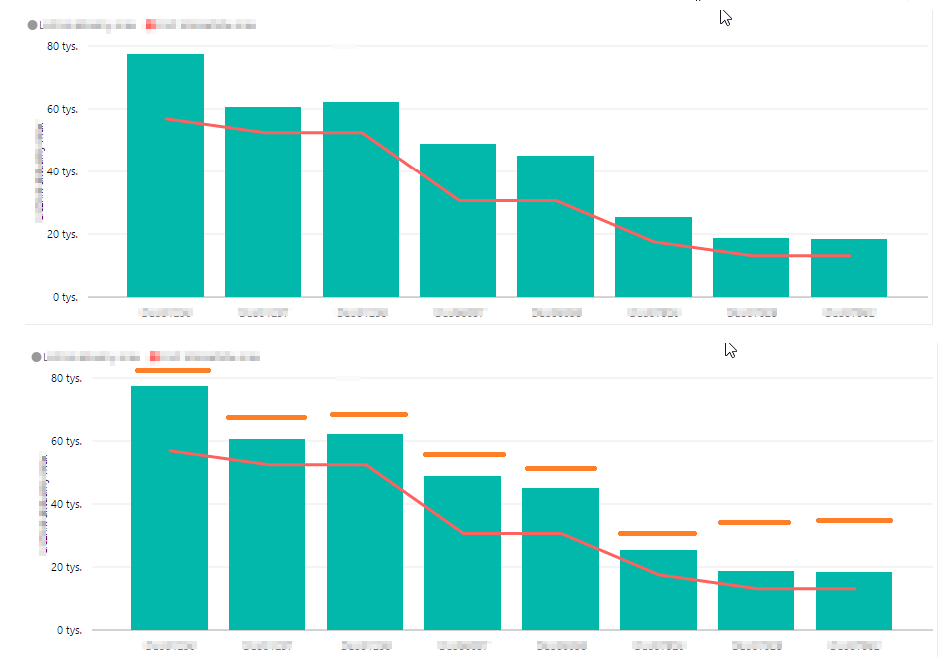
The picture shows a graph that has goals set for each category. I do not want these goals to be presented in the form of a continuous line (red line) and in the form of a dashed line (orange line)
Solved! Go to Solution.
You would have to create your own custom visual for that. Or use a different visual to compare actuals against targets - Clustered column chart seems to be good for that as you can immediately see where actual is lower than the target (comparing columns side by side).
Don't miss out on Data Days, June 15 through August 7. Learn Fabric, Power BI, SQL, AI and more.
Check out the May 2026 Power BI update to learn about new features.
| User | Count |
|---|---|
| 24 | |
| 22 | |
| 21 | |
| 20 | |
| 14 |
| User | Count |
|---|---|
| 59 | |
| 52 | |
| 41 | |
| 33 | |
| 32 |