Share feedback directly with Fabric product managers, participate in targeted research studies and influence the Fabric roadmap.
Sign up nowGet Fabric certified for FREE! Don't miss your chance! Learn more
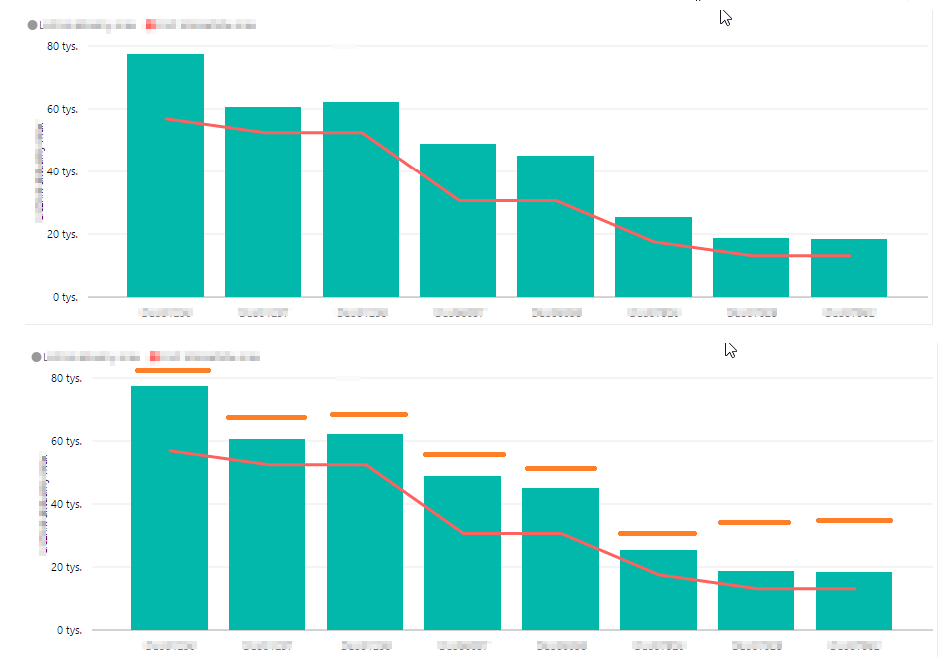
The picture shows a graph that has goals set for each category. I do not want these goals to be presented in the form of a continuous line (red line) and in the form of a dashed line (orange line)
Solved! Go to Solution.
You would have to create your own custom visual for that. Or use a different visual to compare actuals against targets - Clustered column chart seems to be good for that as you can immediately see where actual is lower than the target (comparing columns side by side).
Share feedback directly with Fabric product managers, participate in targeted research studies and influence the Fabric roadmap.
| User | Count |
|---|---|
| 63 | |
| 62 | |
| 42 | |
| 19 | |
| 16 |
| User | Count |
|---|---|
| 118 | |
| 106 | |
| 38 | |
| 28 | |
| 27 |