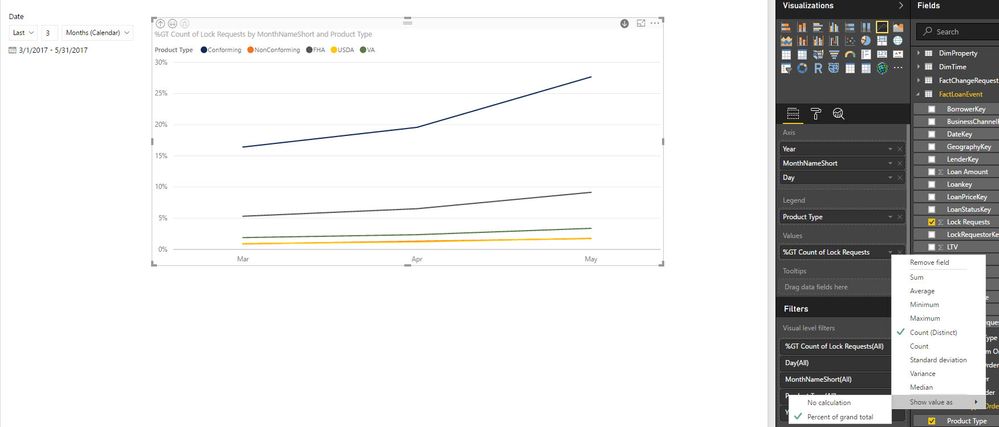
What I'm trying to do is a line chart that's basically the same as a 100% Stacked Column Chart, but displays in a line graph format
X Axis: Month Aggregates (Mar, April, May)
Y Axis: Percentages (0 - 100%)
Legend: Consists of 5 categories (Conforming, FHA, Non-Conforming, USDA, VA)
The line graph will initiallly plot the count of these values for each month in these different catgegories. There is an option to show the value as a percent of the grand total. However, i don't want the percent of the grand total. The grand total takes March values, and divides by the total of March, April, and May.
I would want the percent breakdown for each category just within a given month. So I want a % breakdown for Mar, one for April, and one for May and plot accordingly on the line graph. This is easily done with a 100% Stacked Column Chart as well as a Matrix. However, I can't get this to work for a Line Chart
Example:
Month: March
Conforming: 100
FHA: 50
NonConforming: 25
USDA: 10
VA: 5
Total: 190
So the % breakdown for the month of March is the following:
Conforming: 53%
FHA: 26%
NonConforming: 13%
USDA: 5%
VA: 3%
I don't want to take Conforming values for March (100) and divide them by the grand total of March, April and May.
Does this make sense any thoughts to work around this for a line chart?