cancel
Showing results for 
Search instead for 
Did you mean: 

The Power BI Data Visualization World Championships is back! Get ahead of the game and start preparing now! Learn more

Reply
DNA
Frequent Visitor

Line Chart With Values As a %


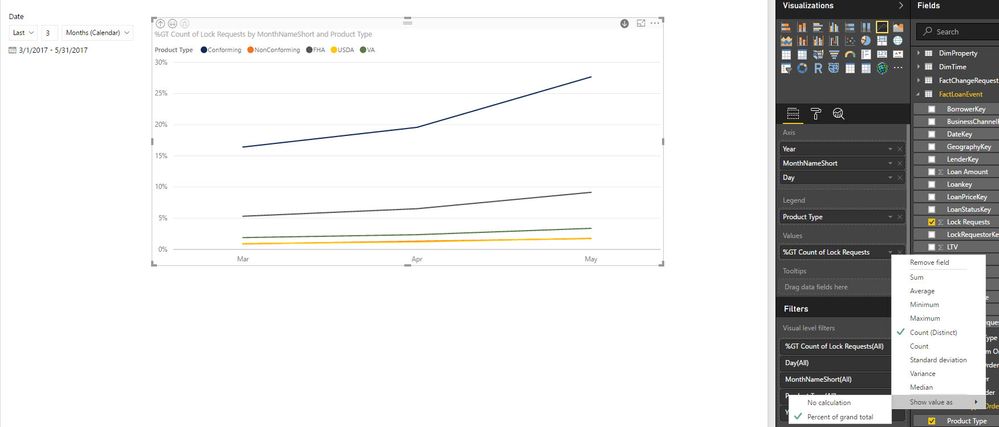
What I'm trying to do is a line chart that's basically the same as a 100% Stacked Column Chart, but displays in a line graph format


X Axis: Month Aggregates (Mar, April, May)

Y Axis: Percentages (0 - 100%)

Legend: Consists of 5 categories (Conforming, FHA, Non-Conforming, USDA, VA)


The line graph will initiallly plot the count of these values for each month in these different catgegories.  There is an option to show the value as a percent of the grand total. However, i don't want the percent of the grand total. The grand total takes March values, and divides by the total of March, April, and May.  


I would want the percent breakdown for each category just within a given month.  So I want a % breakdown for Mar, one for April, and one for May and plot accordingly on the line graph.  This is easily done with a 100% Stacked Column Chart as well as a Matrix.  However,  I can't get this to work for a Line Chart


Example:

Month: March

Conforming: 100 

FHA: 50

NonConforming: 25

USDA: 10

VA: 5


Total:  190


So the % breakdown for the month of March is the following:

Conforming: 53%

FHA: 26%

NonConforming: 13%

USDA: 5%

VA: 3%


I don't want to take Conforming values for March (100) and divide them by the grand total of March, April and May.


Does this make sense any thoughts to work around this for a line chart?
 Line Graph_Percent of TIme Aggregate.jpg


7 REPLIES 7
shkabuzar
Frequent Visitor

Hi,

Please try this.

Measure =
DIVIDE (
    SUM ( Table1[Count] ),
    CALCULATE ( SUM ( Table1[Count] ), ALLSELECTED ( Table1[Category] ) )
)
Anonymous
Not applicable

@shkabuzar thanks, your help is the solution. I can show my graphic i want.

shkabuzar
Frequent Visitor

Same issue with my report,  please some one provide solution for this


anandprakashnm
Frequent Visitor

same issue with me

airaqi
Frequent Visitor

Hi @DNA

I am facing the same issue, did you find a solution?

thanks

airaqi
Frequent Visitor

Hi,

someone else who can help?

mdannemiller
Frequent Visitor

Could you create a column which calculates the percentage for the month, and then use a stacked line chart?  If every month equals 100% it should look like a 100% stacked column chart.

Helpful resources

Announcements
Power BI DataViz World Championships

Power BI Dataviz World Championships

The Power BI Data Visualization World Championships is back! Get ahead of the game and start preparing now!

December 2025 Power BI Update Carousel

Power BI Monthly Update - December 2025

Check out the December 2025 Power BI Holiday Recap!

FabCon Atlanta 2026 carousel

FabCon Atlanta 2026

Join us at FabCon Atlanta, March 16-20, for the ultimate Fabric, Power BI, AI and SQL community-led event. Save $200 with code FABCOMM.

Top Solution Authors