cancel
Showing results for 
Search instead for 
Did you mean: 

The Power BI Data Visualization World Championships is back! Get ahead of the game and start preparing now! Learn more

Reply
miguel_garcia
Regular Visitor

Latitude/Longitude Classification/Conditional

Hello, 


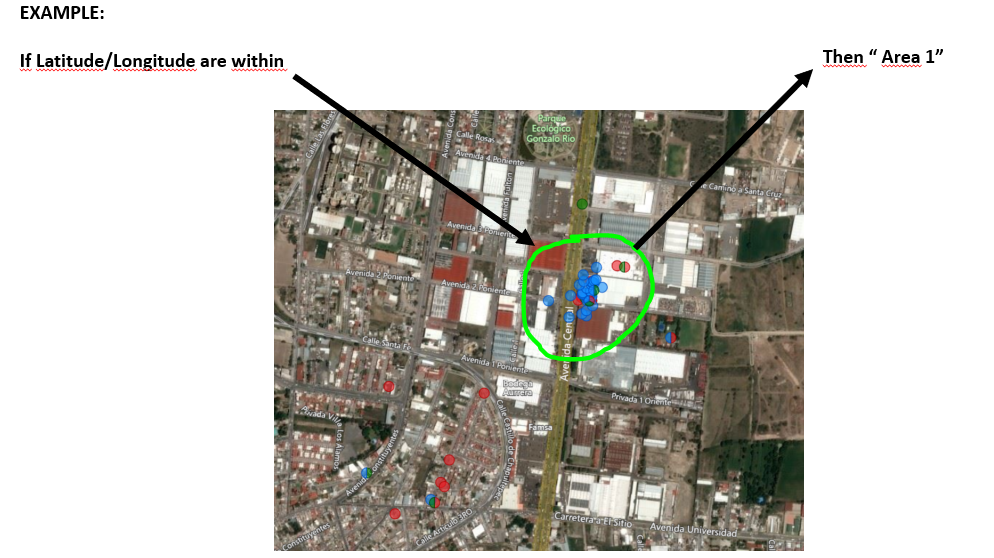
I´ve been trying to classify a certain latitude/longitude(point) within Power Bi according to an specific area which is not exactly a Shape Maps / Choropletic Standard (Country, state, etc). 


The area its an specific one for a special need, I tried with ArcGis "Multiple Select" and its kinda what I need, but it only filters them, and I need to classify them according to that area, something quite like a "Conditional Column" According to that specific area.


example.PNG


Thank you very much for your help!!!!


Miguel


2 ACCEPTED SOLUTIONS
v-gizhi-msft
Community Support
Community Support

Hi,


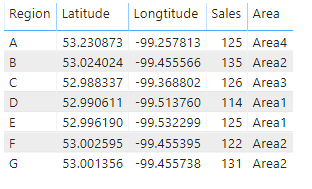
According to your description, i create a simple sample to test:

111.PNG

Then i define a policy and create a calculated column to show its area:

Area = 
SWITCH (
    TRUE,
    'Table'[Latitude] <= 53.00
        && 'Table'[Latitude] > 52.00
        && 'Table'[Longtitude] <= -99.50
        && 'Table'[Longtitude] > -99.54, "Area1",
    'Table'[Latitude] <= 54.00
        && 'Table'[Latitude] > 53.00
        && 'Table'[Longtitude] <= -99.40
        && 'Table'[Longtitude] > -99.50, "Area2",
    'Table'[Latitude] <= 53.00
        && 'Table'[Latitude] > 52.98
        && 'Table'[Longtitude] <= -99.30
        && 'Table'[Longtitude] > -99.39, "Area3",
    'Table'[Latitude] <= 53.30
        && 'Table'[Latitude] > 53.00
        && 'Table'[Longtitude] <= -99.10
        && 'Table'[Longtitude] > -99.30, "Area4"
)

And it shows:

112.PNG

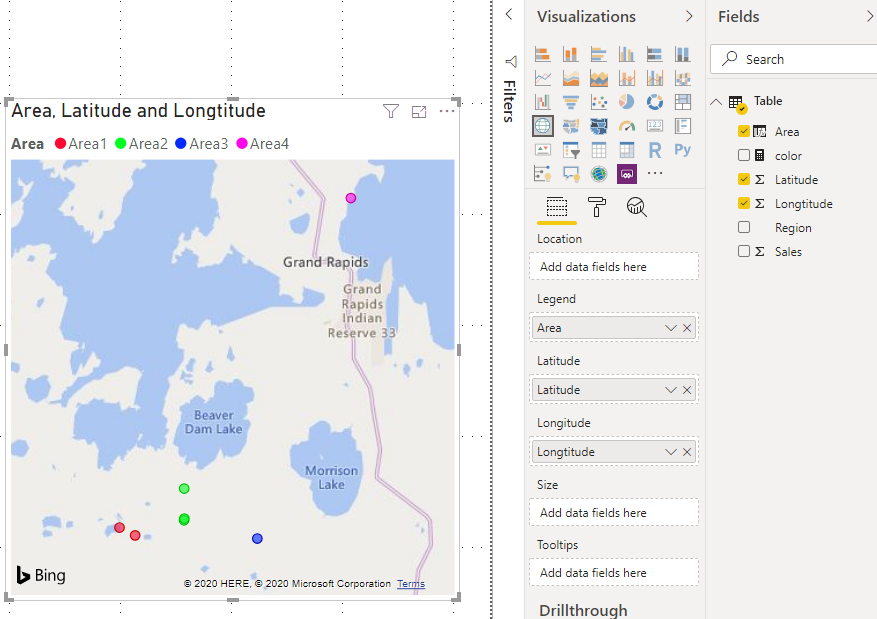
Add this [Area] column to map visual, the result shows:

113.PNG

Hope this helps.


Best Regards,

Giotto Zhi


View solution in original post

Thank you very much for your help Giotto, I solved it !


Miguel

View solution in original post

2 REPLIES 2
v-gizhi-msft
Community Support
Community Support

Hi,


According to your description, i create a simple sample to test:

111.PNG

Then i define a policy and create a calculated column to show its area:

Area = 
SWITCH (
    TRUE,
    'Table'[Latitude] <= 53.00
        && 'Table'[Latitude] > 52.00
        && 'Table'[Longtitude] <= -99.50
        && 'Table'[Longtitude] > -99.54, "Area1",
    'Table'[Latitude] <= 54.00
        && 'Table'[Latitude] > 53.00
        && 'Table'[Longtitude] <= -99.40
        && 'Table'[Longtitude] > -99.50, "Area2",
    'Table'[Latitude] <= 53.00
        && 'Table'[Latitude] > 52.98
        && 'Table'[Longtitude] <= -99.30
        && 'Table'[Longtitude] > -99.39, "Area3",
    'Table'[Latitude] <= 53.30
        && 'Table'[Latitude] > 53.00
        && 'Table'[Longtitude] <= -99.10
        && 'Table'[Longtitude] > -99.30, "Area4"
)

And it shows:

112.PNG

Add this [Area] column to map visual, the result shows:

113.PNG

Hope this helps.


Best Regards,

Giotto Zhi


Thank you very much for your help Giotto, I solved it !


Miguel

Helpful resources

Announcements
Power BI DataViz World Championships

Power BI Dataviz World Championships

The Power BI Data Visualization World Championships is back! Get ahead of the game and start preparing now!

December 2025 Power BI Update Carousel

Power BI Monthly Update - December 2025

Check out the December 2025 Power BI Holiday Recap!

FabCon Atlanta 2026 carousel

FabCon Atlanta 2026

Join us at FabCon Atlanta, March 16-20, for the ultimate Fabric, Power BI, AI and SQL community-led event. Save $200 with code FABCOMM.