Share feedback directly with Fabric product managers, participate in targeted research studies and influence the Fabric roadmap.
Sign up nowGet Fabric certified for FREE! Don't miss your chance! Learn more
Hello,
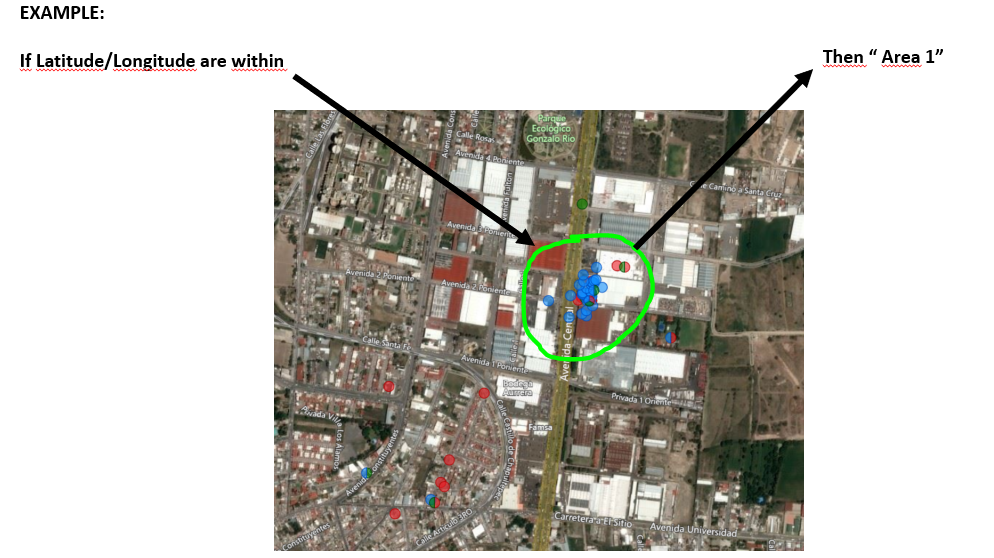
I´ve been trying to classify a certain latitude/longitude(point) within Power Bi according to an specific area which is not exactly a Shape Maps / Choropletic Standard (Country, state, etc).
The area its an specific one for a special need, I tried with ArcGis "Multiple Select" and its kinda what I need, but it only filters them, and I need to classify them according to that area, something quite like a "Conditional Column" According to that specific area.
Thank you very much for your help!!!!
Miguel
Solved! Go to Solution.
Hi,
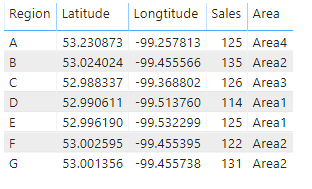
According to your description, i create a simple sample to test:
Then i define a policy and create a calculated column to show its area:
Area =
SWITCH (
TRUE,
'Table'[Latitude] <= 53.00
&& 'Table'[Latitude] > 52.00
&& 'Table'[Longtitude] <= -99.50
&& 'Table'[Longtitude] > -99.54, "Area1",
'Table'[Latitude] <= 54.00
&& 'Table'[Latitude] > 53.00
&& 'Table'[Longtitude] <= -99.40
&& 'Table'[Longtitude] > -99.50, "Area2",
'Table'[Latitude] <= 53.00
&& 'Table'[Latitude] > 52.98
&& 'Table'[Longtitude] <= -99.30
&& 'Table'[Longtitude] > -99.39, "Area3",
'Table'[Latitude] <= 53.30
&& 'Table'[Latitude] > 53.00
&& 'Table'[Longtitude] <= -99.10
&& 'Table'[Longtitude] > -99.30, "Area4"
)And it shows:
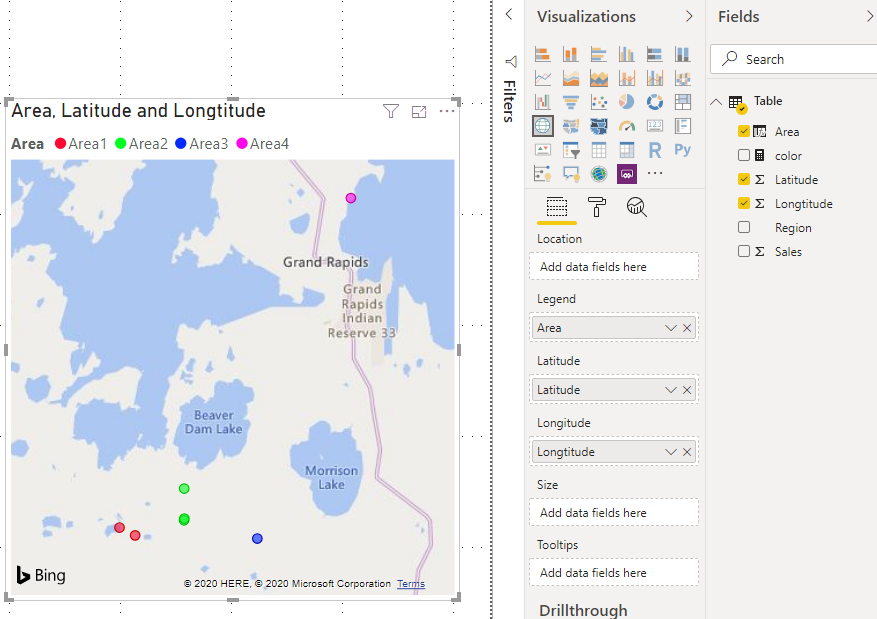
Add this [Area] column to map visual, the result shows:
Hope this helps.
Best Regards,
Giotto Zhi
Hi,
According to your description, i create a simple sample to test:
Then i define a policy and create a calculated column to show its area:
Area =
SWITCH (
TRUE,
'Table'[Latitude] <= 53.00
&& 'Table'[Latitude] > 52.00
&& 'Table'[Longtitude] <= -99.50
&& 'Table'[Longtitude] > -99.54, "Area1",
'Table'[Latitude] <= 54.00
&& 'Table'[Latitude] > 53.00
&& 'Table'[Longtitude] <= -99.40
&& 'Table'[Longtitude] > -99.50, "Area2",
'Table'[Latitude] <= 53.00
&& 'Table'[Latitude] > 52.98
&& 'Table'[Longtitude] <= -99.30
&& 'Table'[Longtitude] > -99.39, "Area3",
'Table'[Latitude] <= 53.30
&& 'Table'[Latitude] > 53.00
&& 'Table'[Longtitude] <= -99.10
&& 'Table'[Longtitude] > -99.30, "Area4"
)And it shows:
Add this [Area] column to map visual, the result shows:
Hope this helps.
Best Regards,
Giotto Zhi
Thank you very much for your help Giotto, I solved it !
Miguel
If you love stickers, then you will definitely want to check out our Community Sticker Challenge!
Check out the January 2026 Power BI update to learn about new features.
| User | Count |
|---|---|
| 62 | |
| 61 | |
| 41 | |
| 21 | |
| 18 |
| User | Count |
|---|---|
| 122 | |
| 117 | |
| 37 | |
| 34 | |
| 30 |