Get certified for free when you join Fabric Data Days 2026 and dive into Fabric, Power BI, SQL, AI, and other essential data skills.
Join nowTry your skills in the Power BI Dataviz World Championship! Round one ends June 26. Join now
Hi
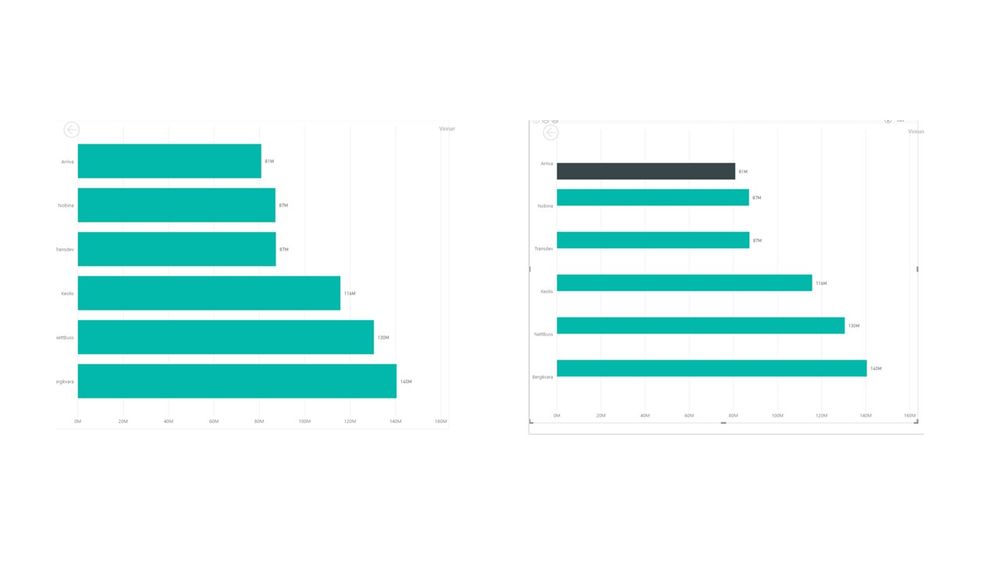
I created a highlighter to point out a certain bar in my chart. I used an if statement to do so. Why is PowerBI screwing up my Y-axis?
Solved! Go to Solution.
it seems the chart on the right is 2 series (teal and black), where the black series has value only for top bar, and teal for all bars except the top one
That is correct, I only want to highlight the top bar and not the others.
any solution?
well right now you're not really highlighting, you're transforming one data series into two, and using different colours for each.
have you tried using the format options instead?
nice solution, but I solved it by changing the chart type.
thx!
Don't miss out on Data Days, June 15 through August 7. Learn Fabric, Power BI, SQL, AI and more.
Check out the May 2026 Power BI update to learn about new features.
| User | Count |
|---|---|
| 22 | |
| 21 | |
| 21 | |
| 20 | |
| 13 |
| User | Count |
|---|---|
| 59 | |
| 53 | |
| 40 | |
| 31 | |
| 26 |