cancel
Showing results for 
Search instead for 
Did you mean: 

Learn from the best! Meet the four finalists headed to the FINALS of the Power BI Dataviz World Championships! Register now

Reply
bkundrat
Advocate I
Advocate I

Key Influencer Visual Y Axis

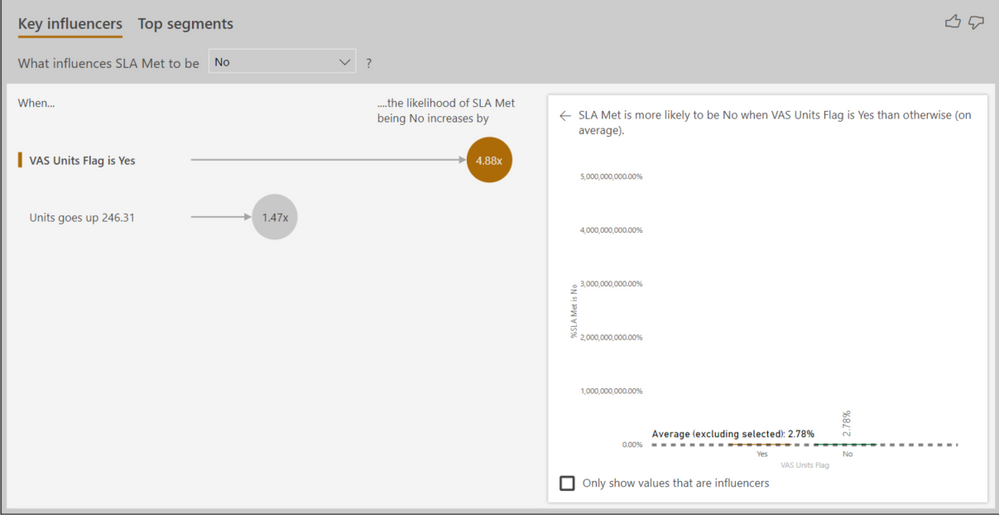
Anyone ever encounter an issue using the Key Influencer visual where the Y axis was showing very large % values where the largest calculated value is much smaller?


For example, I have a configuration using the KI where I'm analyzing whether or not an SLA was met (Yes/No) by one variable wich is also a text variable. My x-axis values are around 8% but my y-axis has a max value of 5,000,000,000.0%.


3 REPLIES 3
v-juanli-msft
Community Support
Community Support

Hi @bkundrat 

Could you show some screenshots to give an example data and columns added to the Key Influencer Visual?


Best Regards
Maggie

My apologies and thanks for the reminder Maggie. I had one all queued up but forgot to attach it.


Key Influencer Y Axis.PNG

Hi @bkundrat 

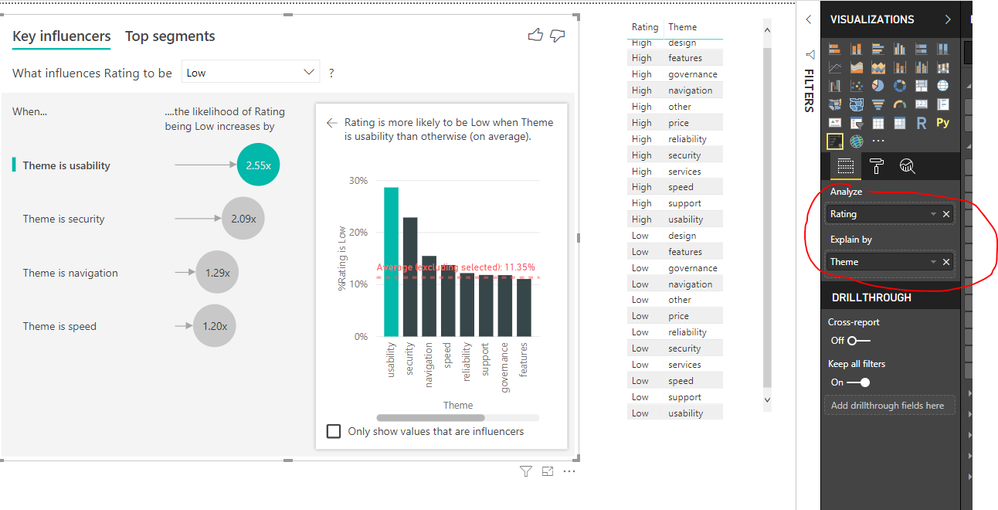
Please show me fields which are added into "Analyze" and "explained by" fileds, also show me the "Analysis type".

You could show me data and visual as i show below

1.png

2.pngBest Regards
Maggie

Helpful resources

Announcements
Join our Fabric User Panel

Join our Fabric User Panel

Share feedback directly with Fabric product managers, participate in targeted research studies and influence the Fabric roadmap.

February Power BI Update Carousel

Power BI Monthly Update - February 2026

Check out the February 2026 Power BI update to learn about new features.

FabCon Atlanta 2026 carousel

FabCon Atlanta 2026

Join us at FabCon Atlanta, March 16-20, for the ultimate Fabric, Power BI, AI and SQL community-led event. Save $200 with code FABCOMM.