Join us at FabCon Atlanta from March 16 - 20, 2026, for the ultimate Fabric, Power BI, AI and SQL community-led event. Save $200 with code FABCOMM.
Register now!The Power BI Data Visualization World Championships is back! Get ahead of the game and start preparing now! Learn more
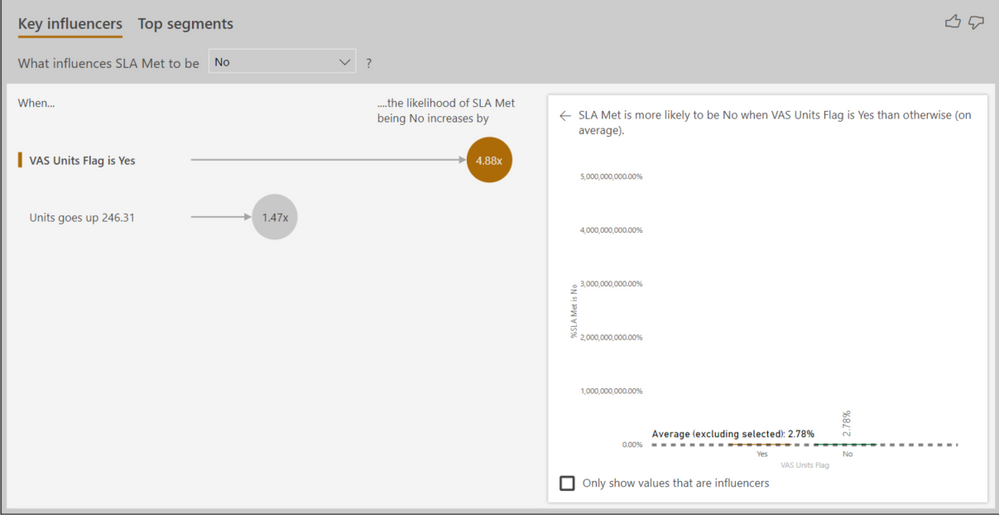
Anyone ever encounter an issue using the Key Influencer visual where the Y axis was showing very large % values where the largest calculated value is much smaller?
For example, I have a configuration using the KI where I'm analyzing whether or not an SLA was met (Yes/No) by one variable wich is also a text variable. My x-axis values are around 8% but my y-axis has a max value of 5,000,000,000.0%.
Hi @bkundrat
Could you show some screenshots to give an example data and columns added to the Key Influencer Visual?
Best Regards
Maggie
My apologies and thanks for the reminder Maggie. I had one all queued up but forgot to attach it.
Hi @bkundrat
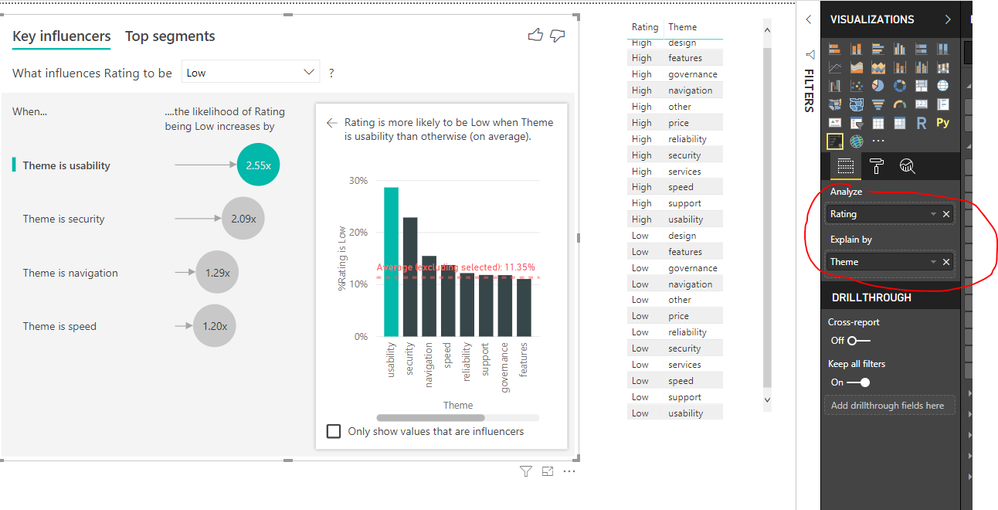
Please show me fields which are added into "Analyze" and "explained by" fileds, also show me the "Analysis type".
You could show me data and visual as i show below
Best Regards
Maggie
The Power BI Data Visualization World Championships is back! Get ahead of the game and start preparing now!
| User | Count |
|---|---|
| 39 | |
| 37 | |
| 33 | |
| 32 | |
| 29 |
| User | Count |
|---|---|
| 133 | |
| 88 | |
| 85 | |
| 68 | |
| 64 |