
Join us at FabCon Atlanta from March 16 - 20, 2026, for the ultimate Fabric, Power BI, AI and SQL community-led event. Save $200 with code FABCOMM.
Register now!Vote for your favorite vizzies from the Power BI Dataviz World Championship submissions. Vote now!
Hey all,
Is there a way to keep specific rows in a table visual no matter what you filter on?
In my case I have a Bill of Material build with multiple levels which means a level 1 item could contain multiple level 2 items etc.
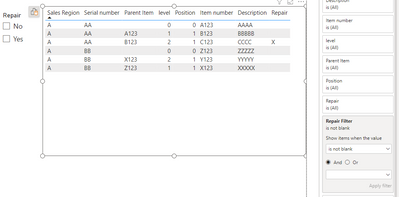
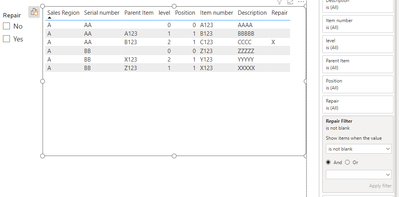
I would like to filter for "Repair" parts (see screenshot) which are marked with "X" but keep the bill of material structure the same and always show me level 0, 1 and 2.
For example in the screenshot I would filter for "X" within "Repair" (with a slicer) and the table should show me all lines for level 0, 1 and 2 as well as the two lines within level 4 (the ones with the x).
I this somehow possible?
Solved! Go to Solution.
Hey @MFelix ,
Thanks for your answer. The data structure is just a table. Same as shown in the screenshot above
Hey @MFelix ,
Thanks for your answer. The data structure is just a table. Same as shown in the screenshot above
HI @ManuelGeiger ,
Add a table for the slicer:
Try the following measure:
Repair Filter =
VAR temptalbe =
FILTER (
SUMMARIZE (
ALL ( 'Table'[Serial number], 'Table'[Repair] ),
'Table'[Serial number],
'Table'[Repair]
),
'Table'[Repair] = "X"
)
VAR SerialNumber =
DISTINCT ( SELECTCOLUMNS ( temptalbe, "SerialNumber", 'Table'[Serial number] ) )
RETURN
SWITCH (
SELECTEDVALUE ( 'Repair Slicer'[Repair] ),
"Yes", IF ( SELECTEDVALUE ( 'Table'[Serial number] ) IN SerialNumber, 1 ),
"No", IF ( NOT ( SELECTEDVALUE ( 'Table'[Serial number] ) IN SerialNumber ), 1 ),
1
)
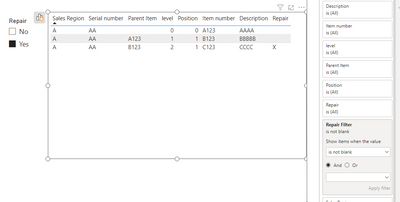
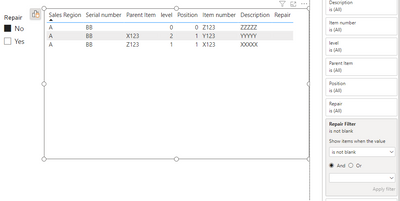
Use the measure has a filter on the table and select has is not blank:
Regards
Miguel Félix
Proud to be a Super User!
Check out my blog: Power BI em PortuguêsHi @ManuelGeiger ,
For this you need to create a measure that allows you to make the filter accordingly, something that will add to all the level the X.
How is your data structured, are you using a parent child hierarchy or a flat table?
Regards
Miguel Félix
Proud to be a Super User!
Check out my blog: Power BI em PortuguêsVote for your favorite vizzies from the Power BI World Championship submissions!
If you love stickers, then you will definitely want to check out our Community Sticker Challenge!
Check out the January 2026 Power BI update to learn about new features.
| User | Count |
|---|---|
| 58 | |
| 53 | |
| 40 | |
| 17 | |
| 16 |
| User | Count |
|---|---|
| 116 | |
| 105 | |
| 41 | |
| 34 | |
| 25 |