Learn from the best! Meet the four finalists headed to the FINALS of the Power BI Dataviz World Championships! Register now
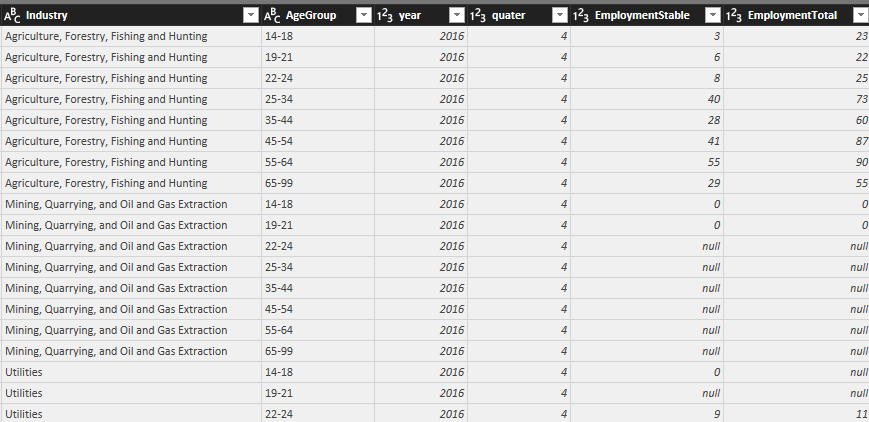
Hello, I am importing data from SQL Server to Power BI Desktop that has NULL values, I can not load them because it gives me an error about the data type, I know I can replace the NULL with zero, but this won't be satisfactory for my data, because "0" and NULL mean different things in my dataset, 0 means no records were made, NULL means the data was hidden for privacy issues, if there any way to convert Nulls to BLANK cells? Or there any other way to keep NULL without replacing it with "0"? Thank you.
Solved! Go to Solution.
Hi axsup,
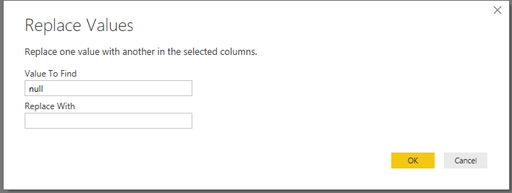
Click replace value then replace null with ' ' as below:
#"Replaced Value" = Table.ReplaceValue(dbo_Test,null," ",Replacer.ReplaceValue,{"Value", "Column"})
Regards,
Jimmy Tao
Hi axsup,
Click replace value then replace null with ' ' as below:
#"Replaced Value" = Table.ReplaceValue(dbo_Test,null," ",Replacer.ReplaceValue,{"Value", "Column"})
Regards,
Jimmy Tao
Thank you for your help!
If you have recently started exploring Fabric, we'd love to hear how it's going. Your feedback can help with product improvements.
A new Power BI DataViz World Championship is coming this June! Don't miss out on submitting your entry.
Share feedback directly with Fabric product managers, participate in targeted research studies and influence the Fabric roadmap.
| User | Count |
|---|---|
| 57 | |
| 38 | |
| 34 | |
| 19 | |
| 16 |
| User | Count |
|---|---|
| 70 | |
| 66 | |
| 42 | |
| 32 | |
| 25 |