cancel
Showing results for 
Search instead for 
Did you mean: 

Learn from the best! Meet the four finalists headed to the FINALS of the Power BI Dataviz World Championships! Register now

Reply
axsup
New Member

Keep Null Values

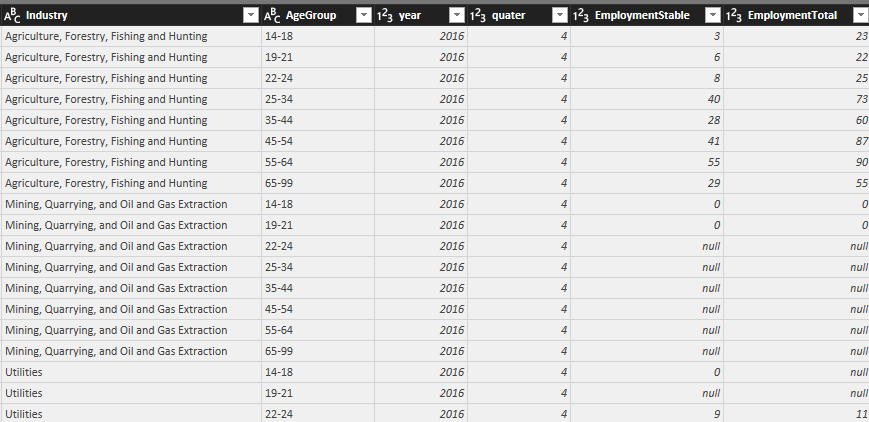
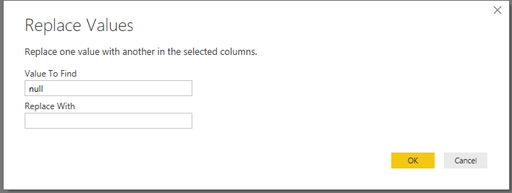
Hello, I am importing data from SQL Server to Power BI Desktop that has NULL values, I can not load them because it gives me an error about the data type, I know I can replace the NULL with zero, but this won't be satisfactory for my data, because "0" and NULL mean different things in my dataset, 0 means no records were made, NULL means the data was hidden for privacy issues, if there any way to convert Nulls to BLANK  cells? Or there any other way to keep NULL without replacing it with "0"? Thank you. Screenshot_1.pngScreenshot_2.png 

1 ACCEPTED SOLUTION
v-yuta-msft
Community Support
Community Support

Hi axsup,


Click replace value then replace null with ' ' as below:

捕获.PNG 

#"Replaced Value" = Table.ReplaceValue(dbo_Test,null," ",Replacer.ReplaceValue,{"Value", "Column"})

Regards,

Jimmy Tao

View solution in original post

2 REPLIES 2
v-yuta-msft
Community Support
Community Support

Hi axsup,


Click replace value then replace null with ' ' as below:

捕获.PNG 

#"Replaced Value" = Table.ReplaceValue(dbo_Test,null," ",Replacer.ReplaceValue,{"Value", "Column"})

Regards,

Jimmy Tao

Thank you for your help!

Helpful resources

Announcements
Join our Fabric User Panel

Join our Fabric User Panel

Share feedback directly with Fabric product managers, participate in targeted research studies and influence the Fabric roadmap.

February Power BI Update Carousel

Power BI Monthly Update - February 2026

Check out the February 2026 Power BI update to learn about new features.

FabCon Atlanta 2026 carousel

FabCon Atlanta 2026

Join us at FabCon Atlanta, March 16-20, for the ultimate Fabric, Power BI, AI and SQL community-led event. Save $200 with code FABCOMM.

Top Kudoed Authors