
cancel
Showing results for 
Search instead for 
Did you mean: 

We've captured the moments from FabCon & SQLCon that everyone is talking about, and we are bringing them to the community, live and on-demand. Starts on April 14th. Register now

Reply
javieezy
Helper I
Helper I

KPI wrong value

Hi im having a KPI problem here i've checked several posts but couldn't be able to solve my problems. 


Objective: Shows YTD average of the KPI. The correct value should be:

javieezy_0-1620838513152.png


But the I change it to KPI visual, it shows only the amount of the performance last week. 

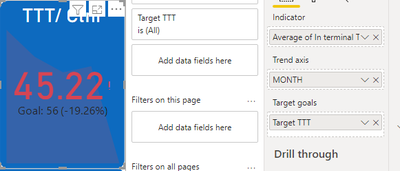
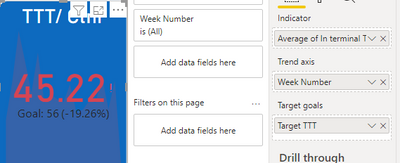
javieezy_1-1620838572005.pngjavieezy_2-1620838915570.png


Seems like if no matter if its Month or by Week. 


The data is from a Excel file, month looks like this, from month 1 - 5. Week number in the same way. 

javieezy_3-1620838981594.png


The problem should be: what should I put in Trend axis in order to show YTD value? 


Appreciate your help!

1 ACCEPTED SOLUTION
HashamNiaz
Solution Sage
Solution Sage

Hi !

Seems like you are using KPI viusal. It has a problem, when you plot this against Date dimension or any member or Date Dimension it will show the Last Member Value of that element.

Meanining if you plot it against Months, So it will show the KPI value for the month which is been last in the current context.


To overcome this you can overlay 2 objects, 1 with Year so it will give you yearly YTD KPI value, and other with month to show monthly trend. For Yearly one you can turn off the trend axis, For Monthly one you can hide the KPI value.

View solution in original post

1 REPLY 1
HashamNiaz
Solution Sage
Solution Sage

Hi !

Seems like you are using KPI viusal. It has a problem, when you plot this against Date dimension or any member or Date Dimension it will show the Last Member Value of that element.

Meanining if you plot it against Months, So it will show the KPI value for the month which is been last in the current context.


To overcome this you can overlay 2 objects, 1 with Year so it will give you yearly YTD KPI value, and other with month to show monthly trend. For Yearly one you can turn off the trend axis, For Monthly one you can hide the KPI value.

Helpful resources

Announcements
New to Fabric survey Carousel

New to Fabric Survey

If you have recently started exploring Fabric, we'd love to hear how it's going. Your feedback can help with product improvements.

Power BI DataViz World Championships carousel

Power BI DataViz World Championships - June 2026

A new Power BI DataViz World Championship is coming this June! Don't miss out on submitting your entry.

Join our Fabric User Panel

Join our Fabric User Panel

Share feedback directly with Fabric product managers, participate in targeted research studies and influence the Fabric roadmap.

March Power BI Update Carousel

Power BI Community Update - March 2026

Check out the March 2026 Power BI update to learn about new features.