cancel
Showing results for 
Search instead for 
Did you mean: 

The Power BI Data Visualization World Championships is back! Get ahead of the game and start preparing now! Learn more

Reply
guilledo24
Regular Visitor

KPI Visualisation

Hi,

I'm facing the next problem, I have this table


Client   |  Avail. Hours | Spend Hours | Resume Hours

Client1               5                 8                  -3

Client2              15               10                  5

Client3               7                14                 -7

Client4              50               50                  0


I need to show in a KPI the count of clients that have negative values in the column Resum Hours.

If count > 0 Then show red and the count, if <= 0 Then show green.


Thanks

1 ACCEPTED SOLUTION

Hi @guilledo24,


You may could create 'resume hours' as a calculated column then we could use count function, because the syntax of Count is Count<column>.


You could refer to the fomula below. Calculated Column resume Hours and Measure resume hours<0.


Resume Hours = 'Table1'[Avail. Hours]-'Table1'[Spend Hours]

resume hours<0 = var tem= CALCULATE(COUNT('Table1'[Resume Hours]),FILTER(ALL('Table1'),'Table1'[Resume Hours]<0))return  IF( tem>0,tem,-1)

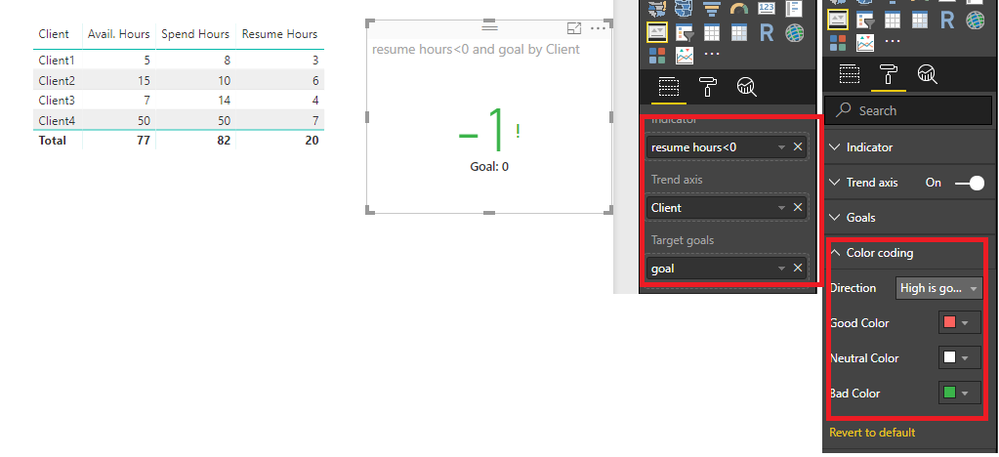
Here is the ouput.


Capture.PNG


Best Regards,

Cherry

Community Support Team _ Cherry Gao
If this post helps, then please consider Accept it as the solution to help the other members find it more quickly.

View solution in original post

3 REPLIES 3
v-piga-msft
Resident Rockstar
Resident Rockstar

Hi  @guilledo24,


I have made a test with your data.


You could refer to the steps below.


1. create a calculated colum with the expression below.

goal = 0

2. Create a measure with formula below.

resume hours<0 =
VAR tem =
    CALCULATE (
        COUNT ( 'Table1'[Resume Hours] );
        FILTER ( ALL ( 'Table1' ); 'Table1'[Resume Hours] < 0 )
    )
RETURN
    IF ( tem > 0; tem; -1 )

3. You could create the KPI visual with goal and measure and set the color like below.


Untitled.png


More details, you could refer to the test file attached.


Best Regards,

Cherry

Community Support Team _ Cherry Gao
If this post helps, then please consider Accept it as the solution to help the other members find it more quickly.

Sorry, I forget to tell you that "resume hours" is a measure.

Hi @guilledo24,


You may could create 'resume hours' as a calculated column then we could use count function, because the syntax of Count is Count<column>.


You could refer to the fomula below. Calculated Column resume Hours and Measure resume hours<0.


Resume Hours = 'Table1'[Avail. Hours]-'Table1'[Spend Hours]

resume hours<0 = var tem= CALCULATE(COUNT('Table1'[Resume Hours]),FILTER(ALL('Table1'),'Table1'[Resume Hours]<0))return  IF( tem>0,tem,-1)

Here is the ouput.


Capture.PNG


Best Regards,

Cherry

Community Support Team _ Cherry Gao
If this post helps, then please consider Accept it as the solution to help the other members find it more quickly.

Helpful resources

Announcements
Power BI DataViz World Championships

Power BI Dataviz World Championships

The Power BI Data Visualization World Championships is back! Get ahead of the game and start preparing now!

December 2025 Power BI Update Carousel

Power BI Monthly Update - December 2025

Check out the December 2025 Power BI Holiday Recap!

FabCon Atlanta 2026 carousel

FabCon Atlanta 2026

Join us at FabCon Atlanta, March 16-20, for the ultimate Fabric, Power BI, AI and SQL community-led event. Save $200 with code FABCOMM.