Join us at FabCon Atlanta from March 16 - 20, 2026, for the ultimate Fabric, Power BI, AI and SQL community-led event. Save $200 with code FABCOMM.
Register now!The Power BI Data Visualization World Championships is back! It's time to submit your entry. Live now!
Hi,
I'm facing the next problem, I have this table
Client | Avail. Hours | Spend Hours | Resume Hours
Client1 5 8 -3
Client2 15 10 5
Client3 7 14 -7
Client4 50 50 0
I need to show in a KPI the count of clients that have negative values in the column Resum Hours.
If count > 0 Then show red and the count, if <= 0 Then show green.
Thanks
Solved! Go to Solution.
Hi @guilledo24,
You may could create 'resume hours' as a calculated column then we could use count function, because the syntax of Count is Count<column>.
You could refer to the fomula below. Calculated Column resume Hours and Measure resume hours<0.
Resume Hours = 'Table1'[Avail. Hours]-'Table1'[Spend Hours]
resume hours<0 = var tem= CALCULATE(COUNT('Table1'[Resume Hours]),FILTER(ALL('Table1'),'Table1'[Resume Hours]<0))return IF( tem>0,tem,-1)
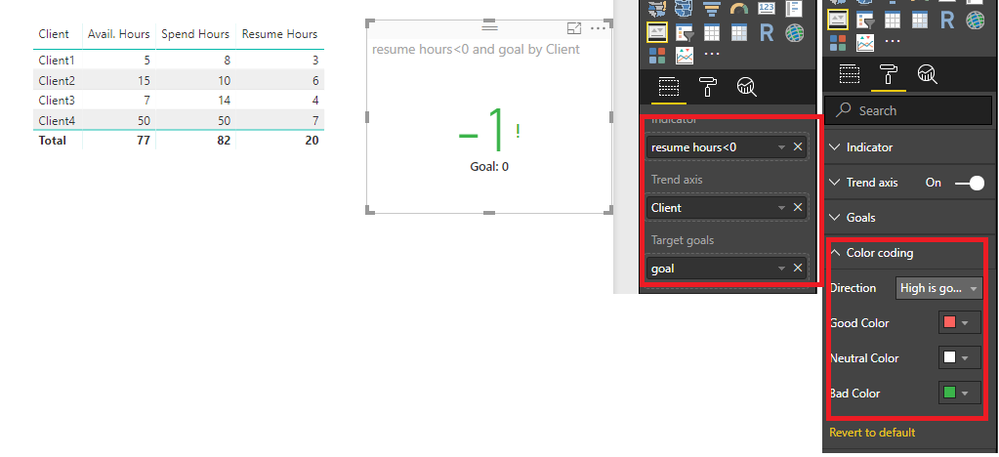
Here is the ouput.
Best Regards,
Cherry
Hi @guilledo24,
I have made a test with your data.
You could refer to the steps below.
1. create a calculated colum with the expression below.
goal = 0
2. Create a measure with formula below.
resume hours<0 =
VAR tem =
CALCULATE (
COUNT ( 'Table1'[Resume Hours] );
FILTER ( ALL ( 'Table1' ); 'Table1'[Resume Hours] < 0 )
)
RETURN
IF ( tem > 0; tem; -1 )
3. You could create the KPI visual with goal and measure and set the color like below.
More details, you could refer to the test file attached.
Best Regards,
Cherry
Sorry, I forget to tell you that "resume hours" is a measure.
Hi @guilledo24,
You may could create 'resume hours' as a calculated column then we could use count function, because the syntax of Count is Count<column>.
You could refer to the fomula below. Calculated Column resume Hours and Measure resume hours<0.
Resume Hours = 'Table1'[Avail. Hours]-'Table1'[Spend Hours]
resume hours<0 = var tem= CALCULATE(COUNT('Table1'[Resume Hours]),FILTER(ALL('Table1'),'Table1'[Resume Hours]<0))return IF( tem>0,tem,-1)
Here is the ouput.
Best Regards,
Cherry
| User | Count |
|---|---|
| 53 | |
| 40 | |
| 35 | |
| 24 | |
| 22 |
| User | Count |
|---|---|
| 136 | |
| 111 | |
| 58 | |
| 43 | |
| 38 |