Get certified for free when you join Fabric Data Days 2026 and dive into Fabric, Power BI, SQL, AI, and other essential data skills.
Join nowJuly 28 - August 9 | Final Round of the Power BI Dataviz World Championships. This is your chance. Learn more
Hi,
I'm facing the next problem, I have this table
Client | Avail. Hours | Spend Hours | Resume Hours
Client1 5 8 -3
Client2 15 10 5
Client3 7 14 -7
Client4 50 50 0
I need to show in a KPI the count of clients that have negative values in the column Resum Hours.
If count > 0 Then show red and the count, if <= 0 Then show green.
Thanks
Solved! Go to Solution.
Hi @guilledo24,
You may could create 'resume hours' as a calculated column then we could use count function, because the syntax of Count is Count<column>.
You could refer to the fomula below. Calculated Column resume Hours and Measure resume hours<0.
Resume Hours = 'Table1'[Avail. Hours]-'Table1'[Spend Hours]
resume hours<0 = var tem= CALCULATE(COUNT('Table1'[Resume Hours]),FILTER(ALL('Table1'),'Table1'[Resume Hours]<0))return IF( tem>0,tem,-1)
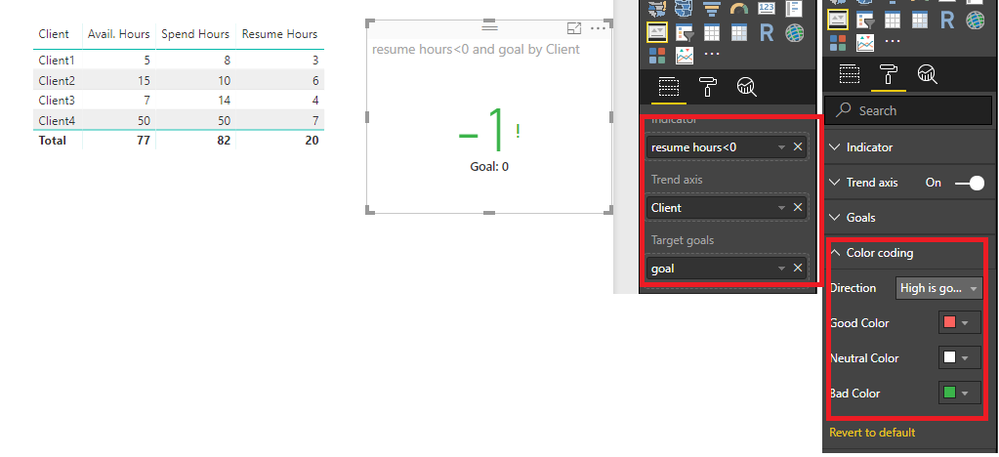
Here is the ouput.
Best Regards,
Cherry
Hi @guilledo24,
I have made a test with your data.
You could refer to the steps below.
1. create a calculated colum with the expression below.
goal = 0
2. Create a measure with formula below.
resume hours<0 =
VAR tem =
CALCULATE (
COUNT ( 'Table1'[Resume Hours] );
FILTER ( ALL ( 'Table1' ); 'Table1'[Resume Hours] < 0 )
)
RETURN
IF ( tem > 0; tem; -1 )
3. You could create the KPI visual with goal and measure and set the color like below.
More details, you could refer to the test file attached.
Best Regards,
Cherry
Sorry, I forget to tell you that "resume hours" is a measure.
Hi @guilledo24,
You may could create 'resume hours' as a calculated column then we could use count function, because the syntax of Count is Count<column>.
You could refer to the fomula below. Calculated Column resume Hours and Measure resume hours<0.
Resume Hours = 'Table1'[Avail. Hours]-'Table1'[Spend Hours]
resume hours<0 = var tem= CALCULATE(COUNT('Table1'[Resume Hours]),FILTER(ALL('Table1'),'Table1'[Resume Hours]<0))return IF( tem>0,tem,-1)
Here is the ouput.
Best Regards,
Cherry
Join us in Barcelona for FabCon and SQLCon, the Fabric, Power BI, SQL, and AI community event. Save €200 with code FABCMTY200.
If you love stickers, then you will definitely want to check out our community sticker challenge, Barcelona edition!
Check out the July 2026 Power BI update to learn about new features.
| User | Count |
|---|---|
| 31 | |
| 28 | |
| 24 | |
| 24 | |
| 19 |
| User | Count |
|---|---|
| 44 | |
| 32 | |
| 18 | |
| 17 | |
| 16 |